
Using AI Agents for Data Engineering: A Practical Guide
How to actually use AI agents as a data engineer in 2026 — Claude, Copilot, Cursor, and Databricks Assistant compared honestly. Includes 5 prompt patterns that produce production code, a workflow for staying in control, and real examples from debugging to building silver transforms.

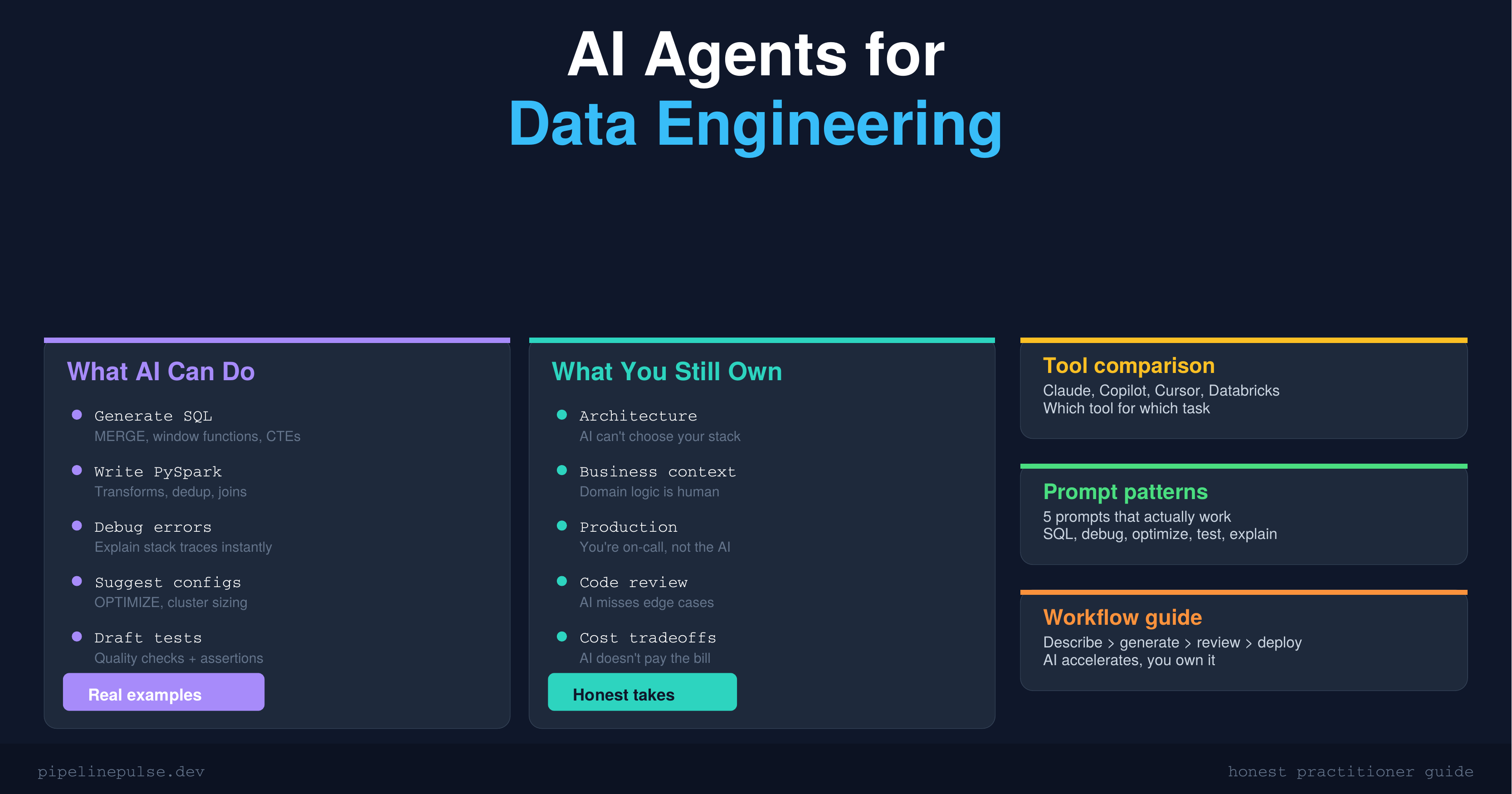
Every data engineer I know is using AI in some form now. But most are using it badly — asking ChatGPT to "write me a pipeline" and getting back generic code that doesn't work with their actual table schemas, cluster configs, or business logic.
The engineers getting real value from AI are doing something different. They're using it as a pair programmer with context, not a magic code generator. They know what AI is good at, what it's terrible at, and how to prompt it for their specific Databricks/PySpark workflows.
This guide covers the practical reality of using AI agents as a data engineer in 2026 — the tools that actually help, the prompts that produce useful code, and the workflow that keeps you in control.
Where AI Helps vs Where It Doesn't
Let's be honest about what AI can and can't do for data engineering work.
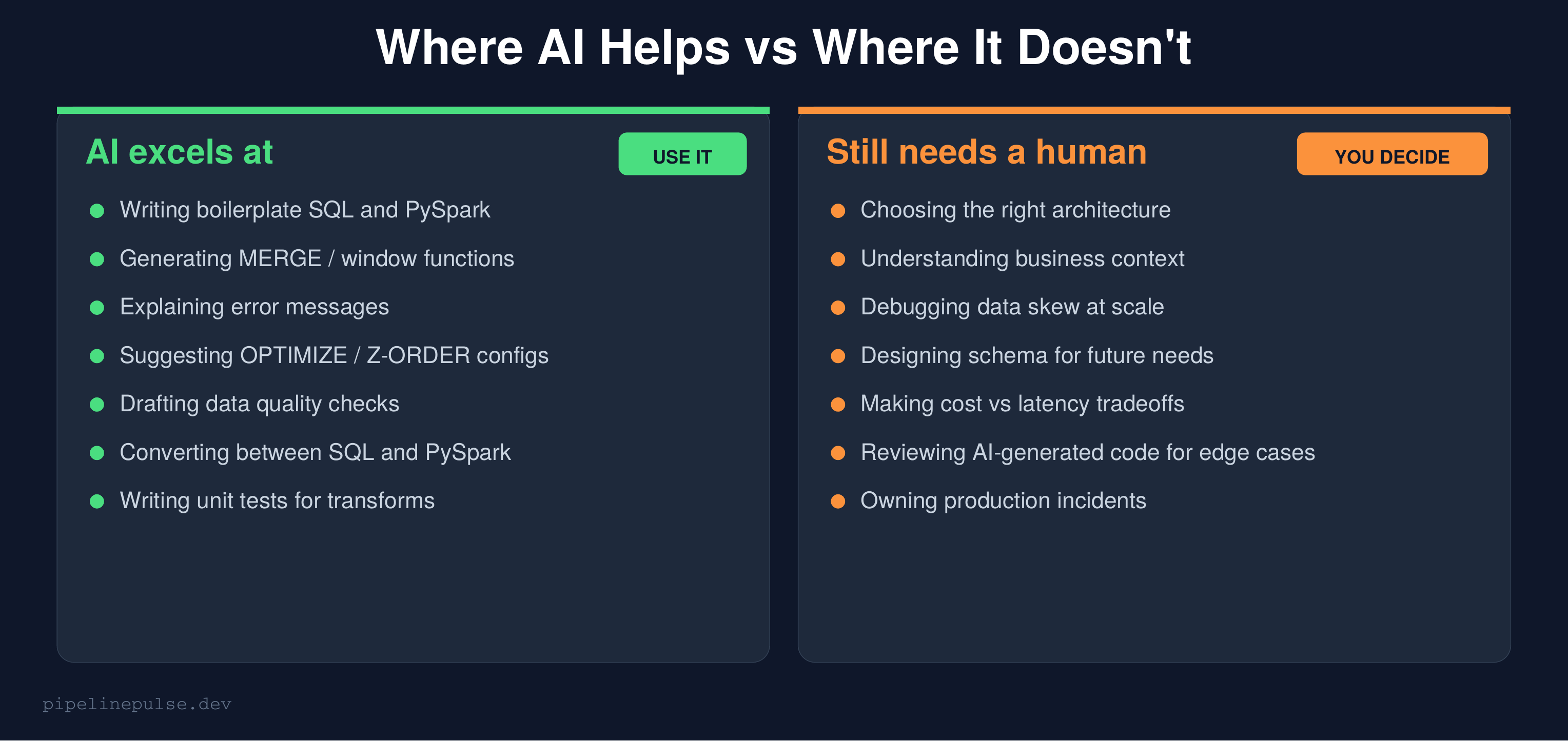
AI is genuinely good at:
- Writing boilerplate SQL and PySpark that would take you 10 minutes but takes AI 10 seconds
- Generating complex syntax you don't have memorized (MERGE conditions, window functions, regex)
- Explaining cryptic error messages and stack traces
- Converting between SQL and PySpark syntax
- Drafting data quality checks and test assertions
- Suggesting table maintenance configs (OPTIMIZE, Z-ORDER, VACUUM)
AI is genuinely bad at:
- Understanding your business domain without extensive context
- Choosing the right architecture for your specific scale and constraints
- Debugging data skew — it can't see your Spark UI
- Making cost vs latency tradeoffs that depend on your budget
- Reviewing its own output for edge cases and production gotchas
The key insight: AI accelerates the writing. You still own the thinking. If you don't understand what the AI-generated code does, you shouldn't run it in production.
The AI Tool Landscape for Data Engineers
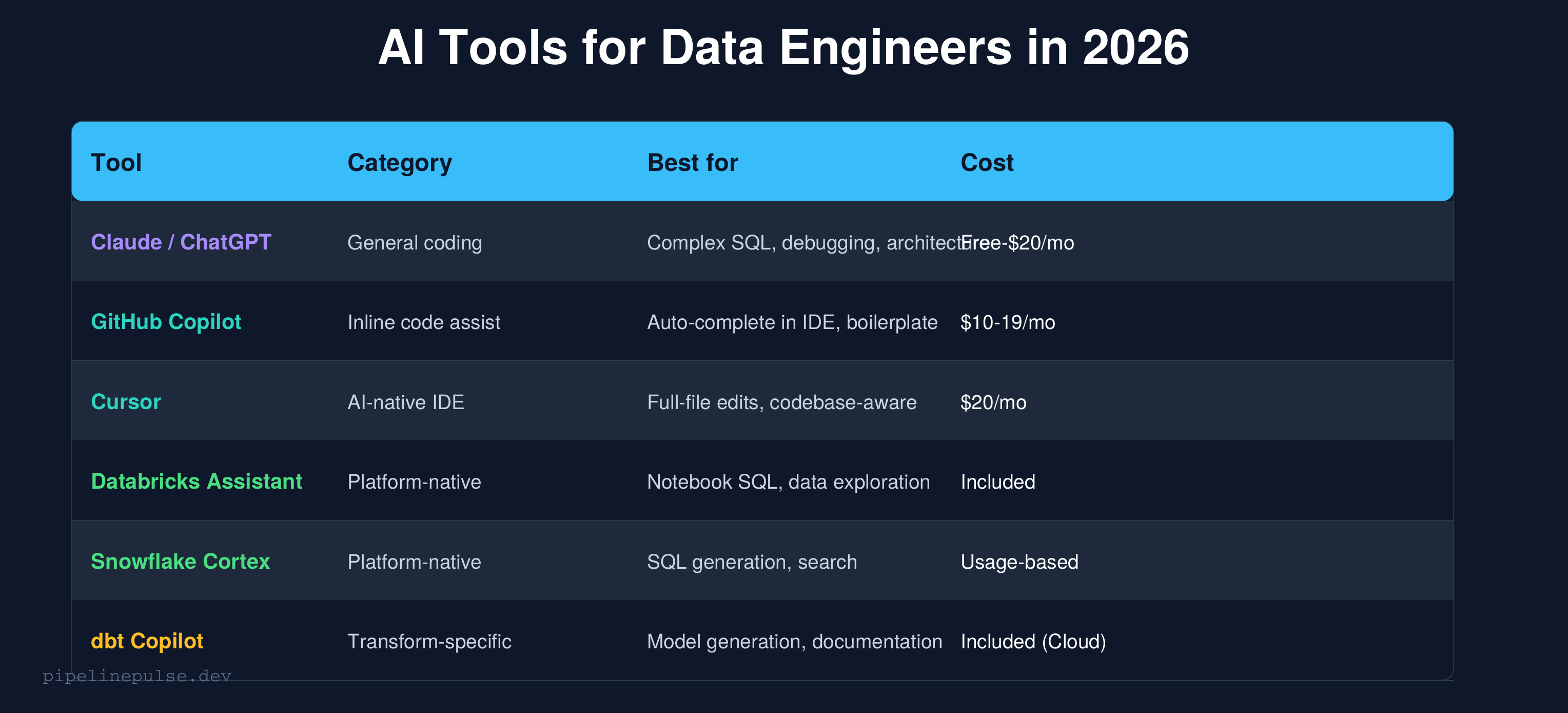
Here's my honest take on each tool after using them all:
Claude / ChatGPT (general-purpose)
Best for complex, multi-step problems where you need to explain context and get a thoughtful response. I use Claude for architecture decisions, debugging complex failures, and generating entire notebooks.
Strengths: Handles long context well, can reason about tradeoffs, generates complete solutions with explanations.
Weakness: Doesn't know your codebase unless you paste it in. No IDE integration (though Claude now has computer use capabilities).
GitHub Copilot (inline autocomplete)
Best for writing code faster inside your IDE. It sees your current file and suggests the next line. Great for boilerplate but doesn't handle complex multi-file logic well.
Strengths: Fast, minimal friction, learns your patterns within a file.
Weakness: Limited context window — doesn't understand your whole pipeline, just the current file.
Cursor (AI-native IDE)
The best option if you want AI deeply integrated into your coding workflow. It can edit entire files, understands your project structure, and lets you chat with your codebase.
Strengths: Codebase-aware, can refactor across files, inline edits.
Weakness: $20/month, learning curve if you're used to VS Code + Copilot.
Databricks Assistant (platform-native)
Built into Databricks notebooks. Good for quick SQL generation and data exploration without leaving the platform.
Strengths: Knows your table schemas, can query catalog metadata, zero setup.
Weakness: Less capable than Claude/GPT for complex logic. Limited to Databricks context.
For a broader review of AI tools including non-coding assistants, see my Best AI Tools for Data Engineers article.
5 Prompts That Actually Work
Generic prompts produce generic code. Here are the prompt patterns I use daily that produce code I can actually run:
Prompt 1: Generate a MERGE with full context
Bad prompt: "Write a MERGE query in Databricks"
Good prompt:
I have a Delta table `catalog.silver.orders` with columns:
- order_id (BIGINT, primary key)
- customer_id (BIGINT)
- amount (DECIMAL(10,2))
- status (STRING: pending, shipped, delivered, cancelled)
- updated_at (TIMESTAMP)

Source data comes from `catalog.bronze.orders` which may have duplicates on order_id.

Write a PySpark MERGE that:
1. Deduplicates the source first (keep latest by updated_at)
2. Updates matching rows only if updated_at is newer
3. Inserts new rows
4. Handles nulls in the amount column (default to 0.0)

Use DeltaTable API, not SQL.
The difference: you gave the AI your actual schema, your actual business rules, and your actual constraints. The output is usable code, not a template.
Prompt 2: Debug an error
Bad prompt: "My Spark job failed, help"
Good prompt:
My Databricks job failed with this error:

[paste the FULL error message and stack trace]

Context:
- Running on DBR 14.3, Photon enabled
- Cluster: 4x Standard_DS4_v2 workers, autoscale 1-8
- The job ran fine yesterday, failed today
- Table size: ~50M rows, partitioned by date

What's the most likely cause and how do I fix it?
Give it the error, the environment, and what changed. AI is surprisingly good at diagnosing errors when given enough context.
Prompt 3: Optimize a slow query
This query takes 45 minutes on a 4-worker cluster:

[paste the query]

Table details:
- `orders`: 200M rows, partitioned by order_date, Z-ORDERed by customer_id
- `customers`: 5M rows, no partitioning

Spark UI shows: one task taking 10x longer than others (data skew).

Suggest optimizations. Consider: partition pruning, broadcast joins,
repartitioning, and whether Z-ORDER columns are optimal.
Prompt 4: Generate quality checks
Generate data quality checks for `catalog.silver.orders`:

Schema:
- order_id: BIGINT, not null, unique
- customer_id: BIGINT, not null
- amount: DECIMAL(10,2), not null, range 0.01 to 999999.99
- status: STRING, allowed values: pending, shipped, delivered, cancelled
- order_date: DATE, not null, range 2020-01-01 to today
- updated_at: TIMESTAMP, not null, must be within last 4 hours

Generate both SQL assertions and a PySpark validation function.
Alert threshold: fail if any check has > 0.5% violation rate.
Prompt 5: Convert SQL to PySpark (or vice versa)
Convert this Databricks SQL to PySpark DataFrame API.
Keep the same logic exactly — don't optimize or change the approach.

[paste SQL query]

Use F for functions (from pyspark.sql import functions as F).
Use Window for window specs.
Add comments explaining each transformation step.
The "don't optimize" instruction is important — you want a faithful conversion first, then you can optimize separately.
📄 Quick references for the code AI helps you write
AI generates the code, but you still need to review it. Keep the Databricks SQL Cheat Sheet and PySpark Window Functions Cheat Sheet handy to verify what AI gives you. $4.99 each.
The AI-Assisted Workflow
Here's how I integrate AI into my actual day-to-day:
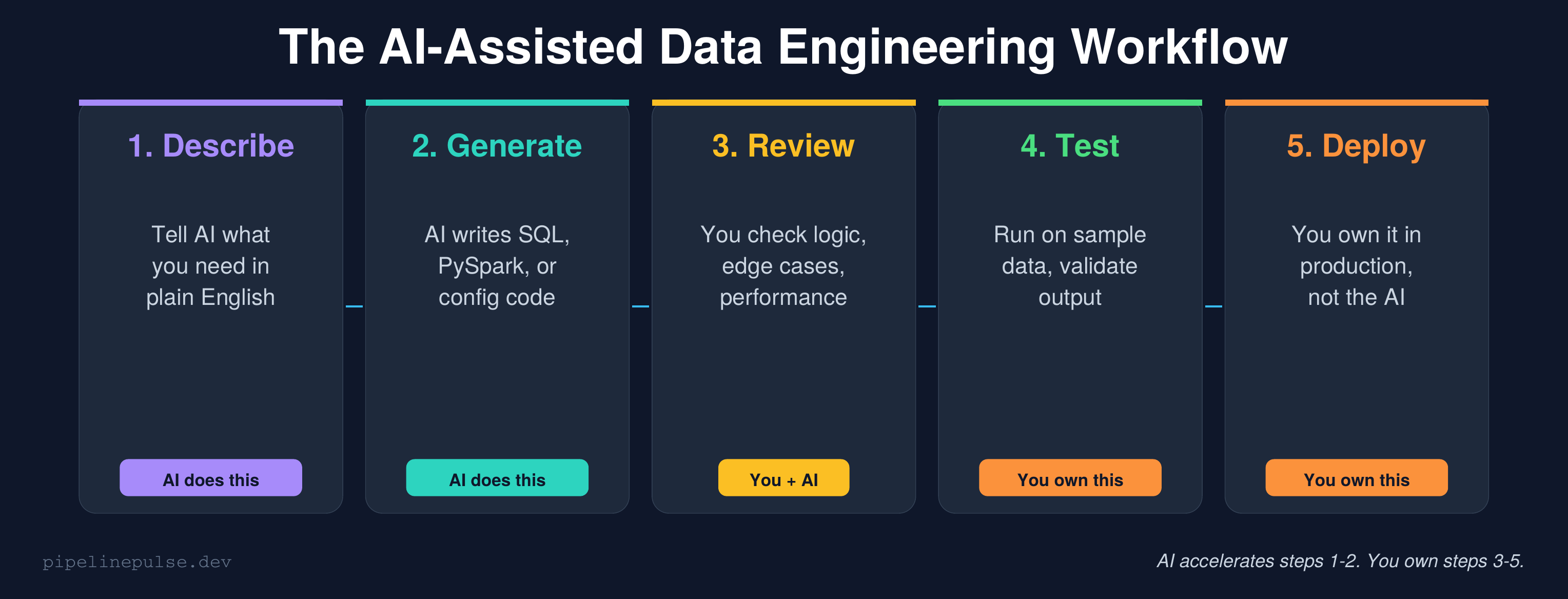
Step 1: Describe (you → AI)
Start by describing what you need in plain English with full context — table schemas, business rules, constraints. The more context you give, the better the output.
Step 2: Generate (AI → code)
AI writes the SQL, PySpark, or config. This usually takes one prompt for simple tasks, 2-3 back-and-forth exchanges for complex ones.
Step 3: Review (you + AI)
This is the critical step most people skip. Read every line. Ask yourself:
- Does this handle nulls correctly?
- What happens if the source has duplicates?
- Are there edge cases with empty partitions?
- Is this going to cause a shuffle I don't want?
- Will this work on my actual data volume?
If something looks off, ask the AI: "What happens in this code if customer_id is null?" — it's often better at finding bugs when you point it in the right direction.
Step 4: Test (you)
Run the code on a sample dataset first. Compare output to expected results. Check the Spark UI for unexpected shuffles or skew. AI can't do this for you — it can't see your cluster.
Step 5: Deploy (you)
You own the code in production. If it breaks at 3am, you're debugging it — not the AI. This means you need to understand every line, not just trust that it works.
Real-World Examples
Example 1: Building a silver layer transform with AI
I needed to build a silver transform for a new table. Instead of writing from scratch, I prompted Claude:
Build a silver layer transform for catalog.bronze.ride_bookings:

Columns: booking_id, rider_id, driver_id, pickup_lat, pickup_lng,
dropoff_lat, dropoff_lng, fare_amount, status, created_at, updated_at

Requirements:
1. Dedup by booking_id (keep latest updated_at)
2. Filter out nulls on booking_id, rider_id, fare_amount
3. Validate fare_amount > 0
4. Lowercase and trim status column
5. Add processing_timestamp column
6. MERGE into catalog.silver.ride_bookings

Use PySpark with DeltaTable API.
Claude generated a complete, working transform in 30 seconds. I reviewed it, added one edge case it missed (handling NaN in fare_amount from the JDBC source), and deployed it. Total time: 10 minutes instead of 45.
Example 2: Using AI to debug a production failure
Our [TMY] Raw Promos notebook started failing with a type mismatch in a when/otherwise chain. The error was cryptic — something about mixed types resolving at plan creation time.
I pasted the full error and the relevant code block into Claude. It identified the root cause immediately: different branches of the when/otherwise were returning different types (STRING vs DOUBLE), and Spark was trying to resolve them at plan creation, not execution.
The fix it suggested — wrapping the expression in expr("cast(try_cast(... as double) / N as string)") for atomic STRING returns — was exactly right. That's a fix I might have spent hours finding through trial and error.
Example 3: Generating a data quality framework
Instead of writing quality checks from scratch for each new table, I prompted:
Generate a reusable Python function that takes a DataFrame,
a list of required non-null columns, a list of primary key columns,
and freshness parameters, then runs completeness, uniqueness,
and freshness checks. Return results as a list of dicts with
table, check_type, column, metric, status.
The output became the foundation of the quality framework I documented in my Data Quality Checks guide. I refined it over a few prompts, added alerting, and it now runs on every pipeline load.
What This Means for Your Career
Let me be direct: data engineering job postings declined 15.2% year-over-year through October 2025, and AI is a factor. But the jobs that remain are more strategic and better paid.
The engineers getting replaced are the ones who only wrote boilerplate SQL and maintained simple pipelines — the work AI can now do. The engineers who are thriving are the ones who:
- Use AI to move 3x faster on the routine work
- Focus their human time on architecture, debugging, and business understanding
- Own production quality — reviewing AI output with the expertise to catch what AI misses
- Build systems (frameworks, contracts, observability) not just individual pipelines
My advice: don't resist AI. Don't fear it. Learn to use it well, and you become the engineer who does in one day what used to take a week. That's not replaceable — that's invaluable.
For structured learning on the tools themselves, DataCamp has courses on Databricks and PySpark that teach the fundamentals AI can't replace. Pluralsight goes deeper on architecture and system design.
Common Gotchas
1. Trusting AI output without review. AI-generated code looks confident even when it's wrong. Always review, especially for edge cases, null handling, and performance.
2. Using AI without context. "Write me a MERGE" gives garbage. "Write me a MERGE for this schema with these business rules" gives production code.
3. Copy-pasting without understanding. If you can't explain what every line does, don't deploy it. AI code in production is YOUR code.
4. Forgetting about data volume. AI writes code that works on 1000 rows. Your table has 500 million. Always test at scale before deploying.
5. Ignoring Spark UI. AI can't see your execution plan. If performance matters, you still need to read the Spark UI for skew, spill, and shuffle.
6. Over-relying on one tool. Claude is better for architecture. Copilot is better for autocomplete. Databricks Assistant is better for exploring your data. Use each where it's strongest.
Get More PipelinePulse Resources
All the patterns AI helps you write faster — MERGE, window functions, quality checks, streaming — are documented in printable quick references:
- PySpark Window Functions Cheat Sheet ($4.99)
- Databricks SQL Cheat Sheet ($4.99)
- Data Quality Monitoring Playbook ($4.99)
- Databricks Debugging Kit ($4.99)
- Pipeline Architecture Templates ($4.99)
- Delta Table Troubleshooting Checklist ($9)
Browse all at pipelinepulse.gumroad.com.
Building data pipelines that don't break at 3am? That's what PipelinePulse is about. More guides at pipelinepulse.dev.