
Databricks Jobs vs Workflows: When to Use What
Single-task jobs vs multi-task workflows in Databricks — when to use each, how to set up DAGs with parallel execution, job clusters vs all-purpose, task dependencies, retry configs, and scheduling. Complete guide with JSON templates and a decision framework.

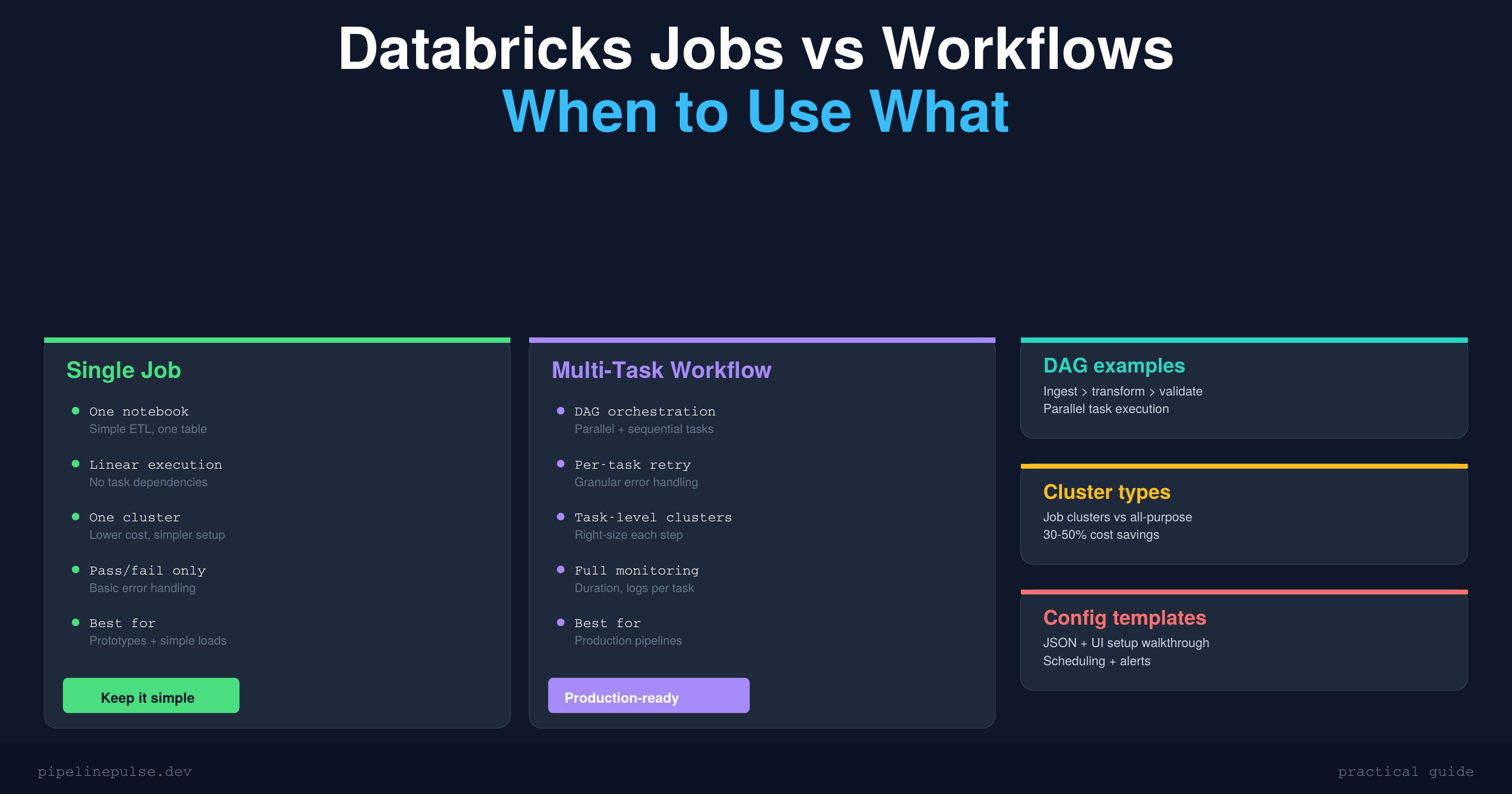
You need to schedule your pipeline. You open Databricks, click Workflows, and immediately face a choice: do you create a single-task job that runs one notebook, or a multi-task workflow with a DAG of dependencies?
Most tutorials skip this decision entirely. They show you how to create a job, but never explain when a single task is enough and when you need the full workflow machinery.
This guide covers both approaches — what they are, how they differ, when to use each, and the exact setup for production pipelines.
The Core Difference
A job in Databricks is a scheduled unit of work. It can contain one or more tasks.
A single-task job runs one notebook (or one JAR, one Python script). It's the simplest option — one input, one output, one cluster.
A multi-task workflow runs multiple tasks with dependencies between them. Tasks execute in a DAG (directed acyclic graph) — some run in parallel, some wait for others to finish.
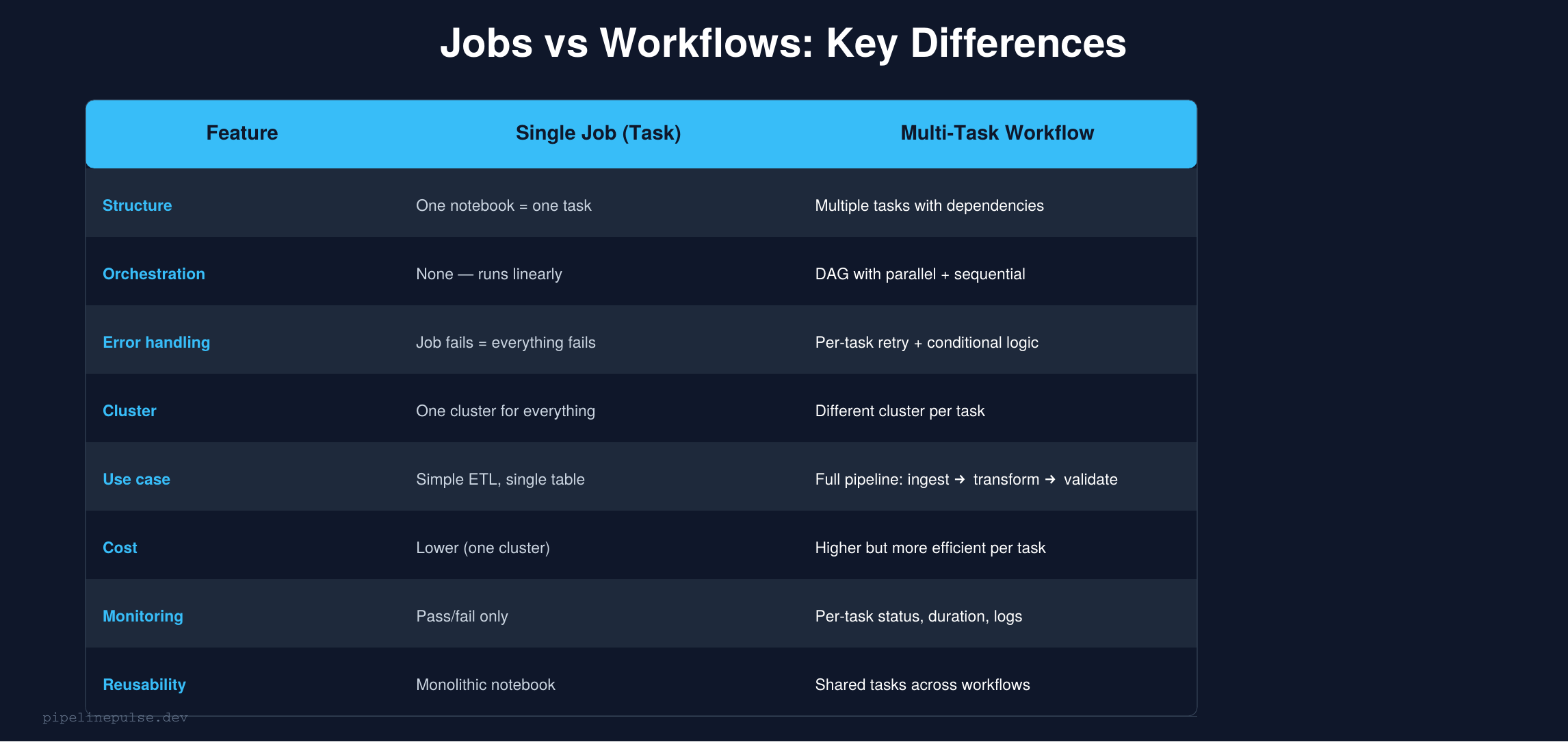
The mental model: a single-task job is a function call. A multi-task workflow is a pipeline.
Single-Task Jobs: When Simple Is Better
A single-task job is the right choice when:
- You're processing one table end-to-end in a single notebook
- There are no dependencies on other tasks completing first
- You want the simplest possible setup (one notebook, one cluster, one schedule)
- You're running an ad-hoc or prototype pipeline
Creating a single-task job
Via the UI:
- Go to Workflows → Create Job
- Give it a name (e.g.,
orders_daily_etl) - Add a task → select your notebook
- Choose a cluster (use a Job cluster for production — more on this below)
- Set the schedule under Triggers (e.g., daily at 6am UTC)
- Save
Via the API / JSON:
{
  "name": "orders_daily_etl",
  "tasks": [
    {
      "task_key": "run_etl",
      "notebook_task": {
        "notebook_path": "/Repos/data-eng/etl/orders_etl"
      },
      "new_cluster": {
        "spark_version": "14.3.x-scala2.12",
        "node_type_id": "Standard_DS3_v2",
        "num_workers": 2
      }
    }
  ],
  "schedule": {
    "quartz_cron_expression": "0 0 6 * * ?",
    "timezone_id": "UTC"
  }
}
Passing parameters
# In your notebook, read parameters with dbutils
source_table = dbutils.widgets.get("source_table")
target_table = dbutils.widgets.get("target_table")
load_date = dbutils.widgets.get("load_date")

# Set defaults for interactive development
dbutils.widgets.text("source_table", "raw.orders")
dbutils.widgets.text("target_table", "silver.orders")
dbutils.widgets.text("load_date", "2026-03-23")
Then pass them in the job config under Parameters:
{
  "source_table": "raw.orders",
  "target_table": "silver.orders",
  "load_date": "{{job.trigger_time.iso_date}}"
}
The {{job.trigger_time.iso_date}} is a dynamic value reference — Databricks fills it in at runtime with the actual trigger date.
Multi-Task Workflows: Production Pipelines
When your pipeline has multiple stages — ingest, transform, validate, notify — a multi-task workflow is the right choice.
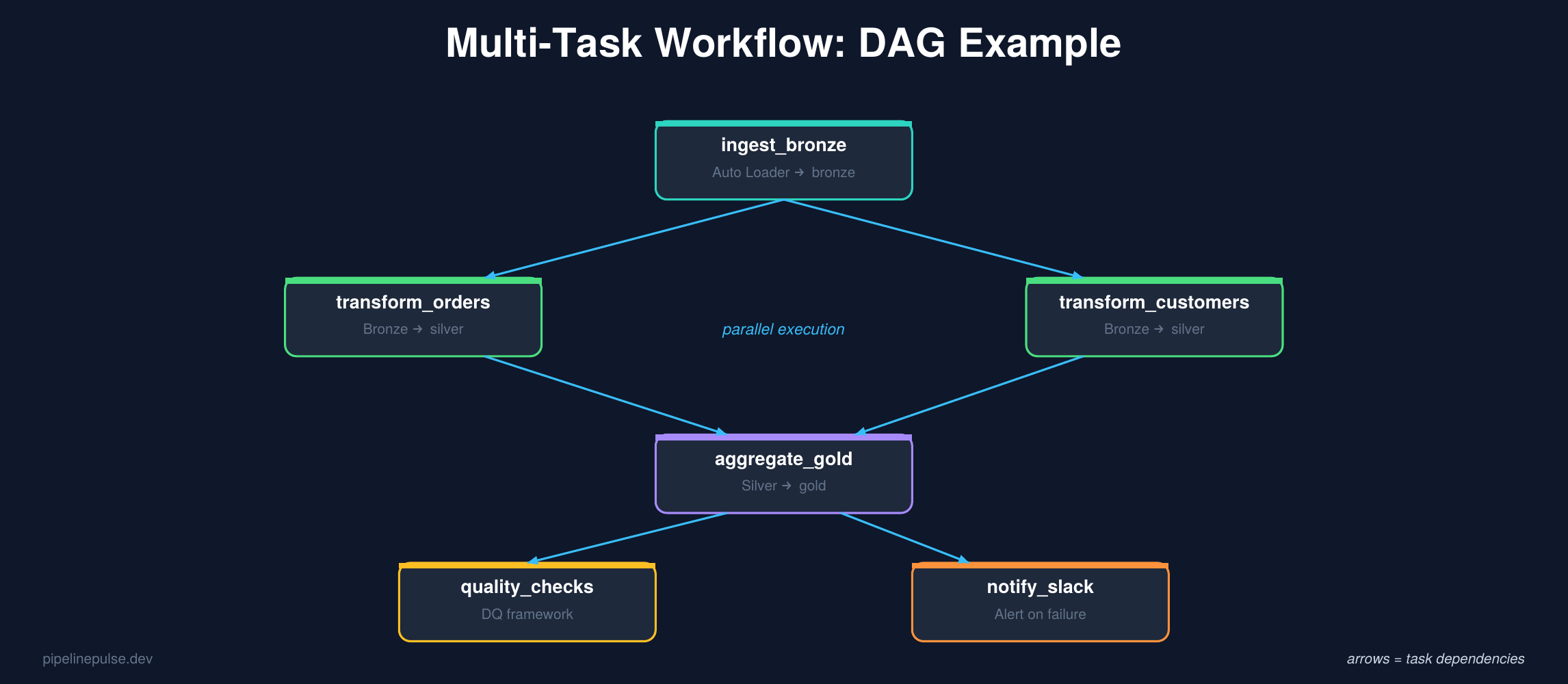
Why multi-task workflows win for production
Parallel execution. Independent tasks run at the same time. In the DAG above, transform_orders and transform_customers run in parallel because they don't depend on each other — cutting total pipeline time significantly.
Per-task error handling. If transform_orders fails but transform_customers succeeds, only the failed task needs to retry. In a single-task job, the entire notebook would need to re-run.
Different clusters per task. Your ingestion task might need a small cluster, but your aggregation task needs a large one. Multi-task workflows let you size each task independently.
Per-task monitoring. You can see exactly which task failed, how long each took, and inspect logs per task — instead of digging through one giant notebook output.
Creating a multi-task workflow
Via the UI:
- Go to Workflows → Create Job
- Name it (e.g.,
orders_pipeline_daily) - Add your first task (
ingest_bronze) - Add a second task (
transform_silver) → set Depends on: ingest_bronze - Add a third task (
aggregate_gold) → set Depends on: transform_silver - Add a fourth task (
quality_checks) → set Depends on: aggregate_gold - Configure clusters for each task (or share one)
- Set the schedule
Via the API / JSON:
{
  "name": "orders_pipeline_daily",
  "tasks": [
    {
      "task_key": "ingest_bronze",
      "notebook_task": {
        "notebook_path": "/pipelines/ingest_bronze"
      },
      "new_cluster": {
        "spark_version": "14.3.x-scala2.12",
        "node_type_id": "Standard_DS3_v2",
        "num_workers": 2
      }
    },
    {
      "task_key": "transform_silver",
      "depends_on": [{"task_key": "ingest_bronze"}],
      "notebook_task": {
        "notebook_path": "/pipelines/transform_silver",
        "base_parameters": {"layer": "silver"}
      },
      "new_cluster": {
        "spark_version": "14.3.x-scala2.12",
        "node_type_id": "Standard_DS4_v2",
        "num_workers": 4
      }
    },
    {
      "task_key": "aggregate_gold",
      "depends_on": [{"task_key": "transform_silver"}],
      "notebook_task": {
        "notebook_path": "/pipelines/aggregate_gold"
      },
      "job_cluster_key": "shared_cluster"
    },
    {
      "task_key": "quality_checks",
      "depends_on": [{"task_key": "aggregate_gold"}],
      "notebook_task": {
        "notebook_path": "/pipelines/run_quality_checks"
      },
      "job_cluster_key": "shared_cluster"
    }
  ],
  "job_clusters": [
    {
      "job_cluster_key": "shared_cluster",
      "new_cluster": {
        "spark_version": "14.3.x-scala2.12",
        "node_type_id": "Standard_DS3_v2",
        "num_workers": 2
      }
    }
  ],
  "schedule": {
    "quartz_cron_expression": "0 0 6 * * ?",
    "timezone_id": "UTC"
  }
}
Notice the job_clusters section — you define shared clusters once and reference them by key. Tasks that don't need special sizing share a cluster, while tasks with heavier workloads get their own new_cluster config.
Task dependencies: parallel vs sequential
// Sequential: B waits for A
{"task_key": "B", "depends_on": [{"task_key": "A"}]}

// Parallel: B and C both wait for A, but run at the same time
{"task_key": "B", "depends_on": [{"task_key": "A"}]}
{"task_key": "C", "depends_on": [{"task_key": "A"}]}

// Fan-in: D waits for both B and C
{"task_key": "D", "depends_on": [{"task_key": "B"}, {"task_key": "C"}]}
Retry and timeout settings
{
  "task_key": "transform_silver",
  "max_retries": 2,
  "min_retry_interval_millis": 60000,
  "retry_on_timeout": true,
  "timeout_seconds": 3600
}
Set retries on tasks that might fail transiently (network issues, temporary cluster problems). Don't set retries on tasks where failure means the data is bad — retrying won't fix bad data.
📄 Ready-to-use pipeline templates
Get the Pipeline Architecture Templates — medallion architecture, batch ETL, streaming upserts, and orchestration patterns with complete PySpark code. $4.99
Job Clusters vs All-Purpose Clusters
This is one of the biggest cost levers in Databricks.
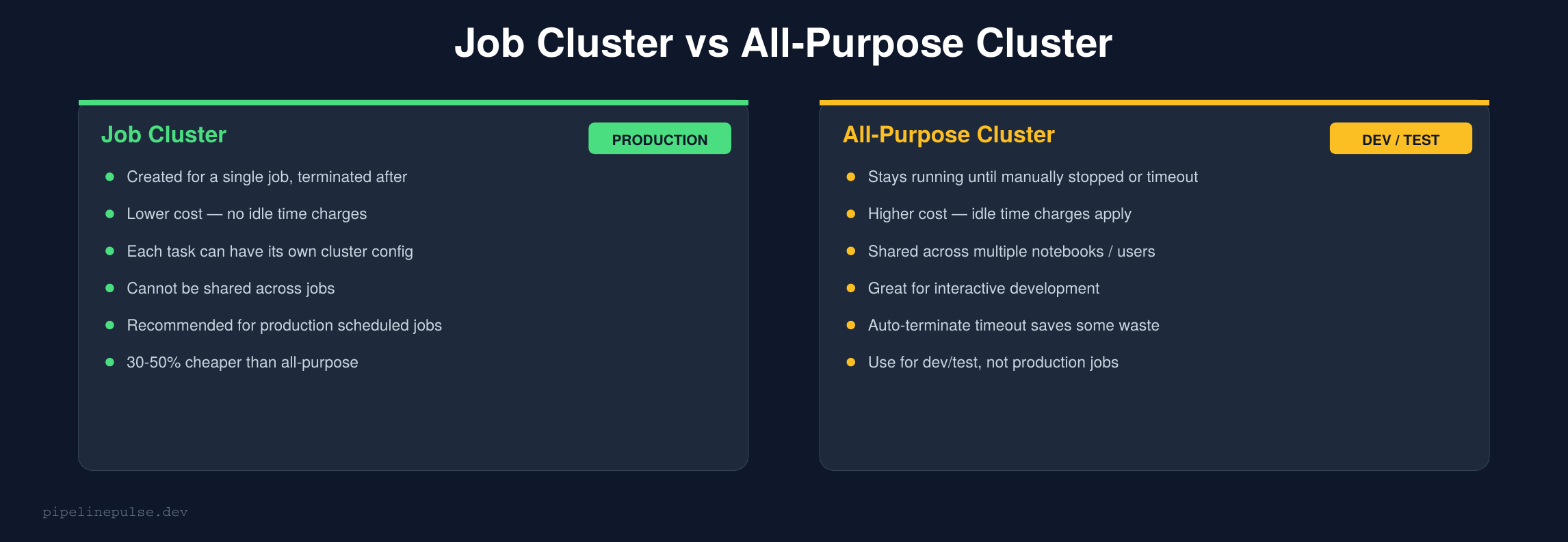
The rule is simple: use job clusters for scheduled production jobs, and all-purpose clusters only for interactive development.
Job clusters are created when the job starts and terminated when it finishes. You pay only for actual compute time. All-purpose clusters stay running (burning money) until someone manually stops them or the auto-terminate timeout kicks in.
I've seen teams cut their Databricks bill by 30-50% just by switching scheduled jobs from all-purpose to job clusters. For a full cost optimization strategy, check my Databricks Cost Optimization Checklist.
When to Use What
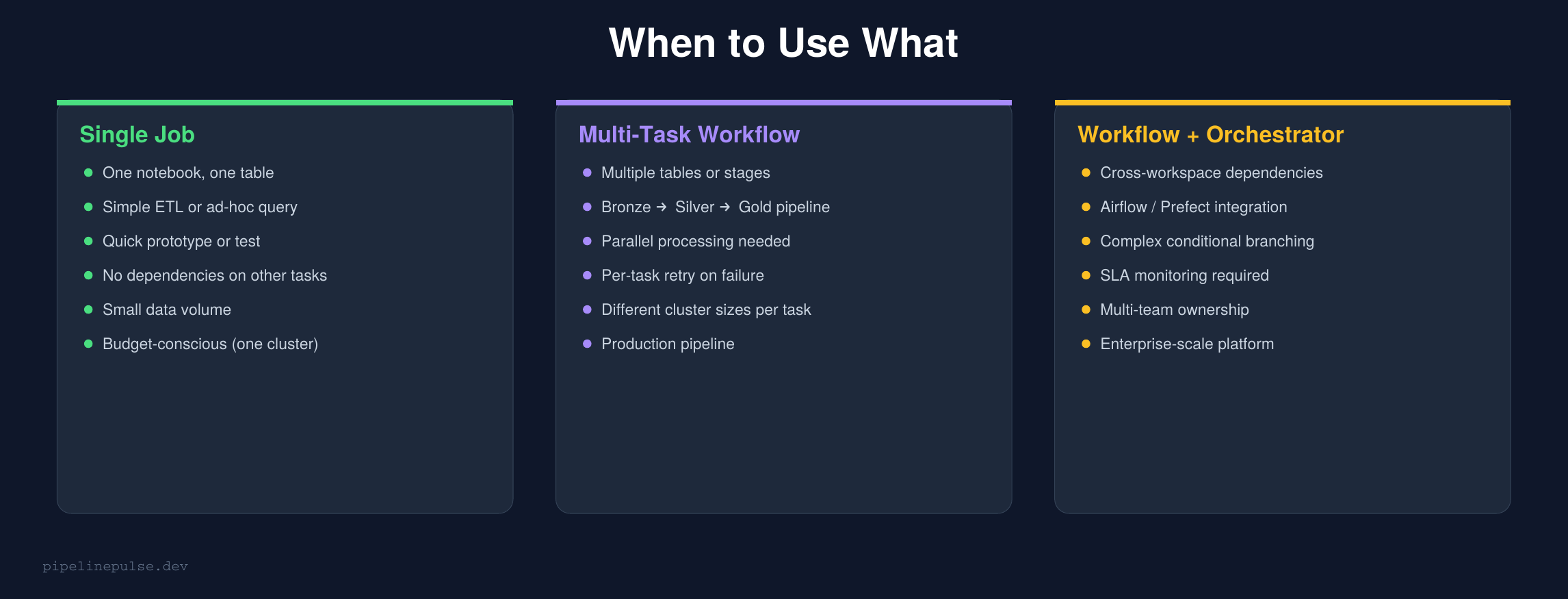
Here's my decision framework:
Start with a single-task job if you're processing one table, have no dependencies, and want the simplest setup. You can always upgrade to a workflow later.
Use a multi-task workflow when you have 2+ stages that depend on each other, need parallel execution, or want per-task monitoring and retry.
Add an external orchestrator (Airflow, Prefect) when you need cross-workspace dependencies, complex conditional branching, SLA monitoring, or multi-team coordination. But honestly, most teams don't need this — Databricks Workflows handle 90% of orchestration needs natively.
If you're designing workflows at scale and want to understand orchestration patterns beyond Databricks — Airflow, Prefect, and hybrid approaches — Pluralsight has courses on data pipeline orchestration that cover the full landscape.
Notifications and Alerts
Both single-task jobs and workflows support notifications:
{
  "email_notifications": {
    "on_failure": ["data-eng@company.com"],
    "on_success": [],
    "no_alert_for_skipped_runs": true
  },
  "webhook_notifications": {
    "on_failure": [
      {"id": "slack_webhook_id"}
    ]
  }
}
For workflows, you can set notifications at the job level (entire workflow fails) and the task level (specific task fails). Task-level alerts are useful when different teams own different stages of the pipeline.
For more on alerting patterns, my Data Quality Monitoring Playbook covers Slack alerts, audit tables, and dbutils.notebook.exit() patterns.
Passing Data Between Tasks
Tasks in a workflow run in separate notebooks, so how do you pass data between them?
Option A: Write to a Delta table (recommended)
The simplest and most reliable approach. Each task writes to a table, the next task reads from it:
# Task 1: transform_silver
result_df.write.format('delta').mode('overwrite') \
    .saveAsTable('catalog.silver.orders')

# Task 2: aggregate_gold (depends on Task 1)
silver_df = spark.table('catalog.silver.orders')
This is the pattern you're already using if you follow a medallion architecture. Each task reads from the previous layer's table.
Option B: Task values (for small metadata)
Databricks supports passing small values between tasks:
# Task 1: set a task value
dbutils.jobs.taskValues.set(key="row_count", value=total_rows)
dbutils.jobs.taskValues.set(key="load_date", value="2026-03-23")

# Task 2: read the task value
row_count = dbutils.jobs.taskValues.get(
    taskKey="transform_silver", key="row_count"
)
Use this for metadata like row counts, status flags, or dates — not for actual data.
Scheduling Tips
Cron expressions — the schedule syntax:
0 0 6 * * ?      → Every day at 6:00 AM
0 0 */4 * * ?    → Every 4 hours
0 30 8 ? * MON-FRI → Weekdays at 8:30 AM
0 0 0 1 * ?      → First day of every month at midnight
Time zones matter. Always set an explicit timezone. UTC is safest for data pipelines — it avoids daylight saving time issues.
Avoid overlapping runs. Set max_concurrent_runs: 1 to prevent a slow run from overlapping with the next scheduled run. If a run is still going when the next trigger fires, the new run is skipped.
{
  "max_concurrent_runs": 1,
  "schedule": {
    "quartz_cron_expression": "0 0 6 * * ?",
    "timezone_id": "UTC",
    "pause_status": "UNPAUSED"
  }
}
Common Gotchas
1. All-purpose clusters for production jobs waste money. Switch to job clusters for 30-50% savings.
2. Forgetting max_concurrent_runs: 1. Without this, a slow run overlapping with the next trigger can cause duplicate data or race conditions.
3. Not setting timeouts. A hung task with no timeout will run forever and burn money. Always set timeout_seconds.
4. Hardcoding paths instead of using parameters. Use dbutils.widgets and base_parameters so the same notebook works in dev and production.
5. Retrying tasks with bad data. Retries only help transient failures (network, cluster). If the data is wrong, retrying won't fix it — add a data quality check task instead.
6. Not using dbutils.notebook.exit() for status signaling. Return a status string so downstream tasks and alerts can react:
if quality_check_passed:
    dbutils.notebook.exit("SUCCESS")
else:
    dbutils.notebook.exit("QUALITY_CHECK_FAILED")
Get the Templates
Want ready-to-use pipeline templates for medallion architecture, batch ETL, streaming upserts, and orchestration patterns? Grab the Pipeline Architecture Templates on Gumroad for $4.99.
Also check out:
- Databricks Debugging Kit ($4.99) — when your jobs fail
- Databricks Cost Optimization Checklist ($4.99) — cut your Databricks bill
- Data Quality Monitoring Playbook ($4.99) — add quality checks to your workflows
- Delta Table Troubleshooting Checklist ($9)
Building data pipelines that don't break at 3am? That's what PipelinePulse is about. More guides at pipelinepulse.dev.