
Medallion Architecture Explained (Bronze, Silver, Gold)
The complete guide to medallion architecture in Databricks — bronze raw ingestion with Auto Loader, silver cleaning with MERGE upserts, gold business aggregations, orchestration, table maintenance, and 5 anti-patterns to avoid. Production code for every layer.

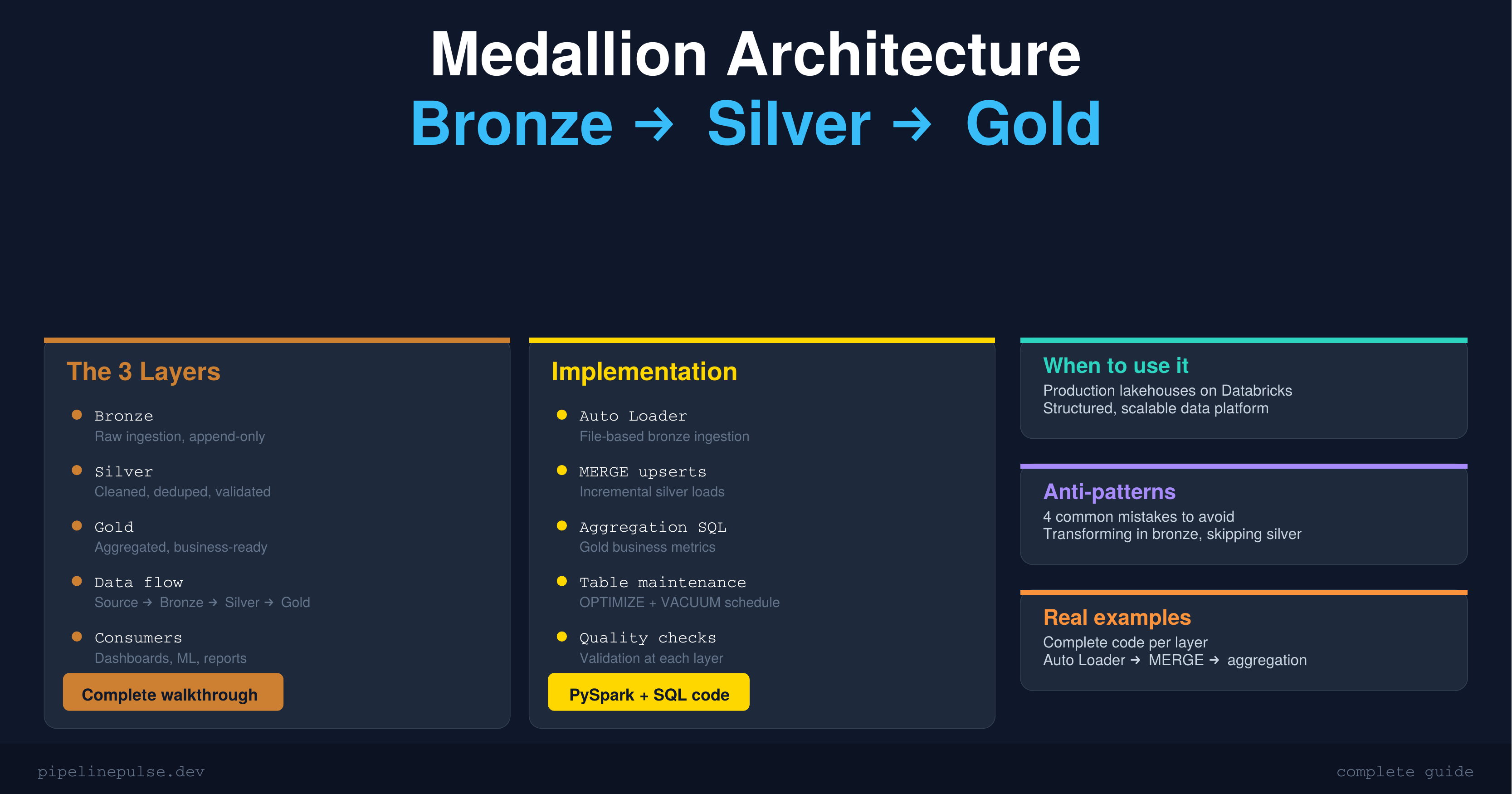
If you've spent any time with Databricks, you've heard the terms "bronze, silver, gold." It's the medallion architecture — and it's the standard way to organize data in a lakehouse.
The concept is simple: data flows through three layers, getting cleaner and more useful at each stage. Bronze is raw, silver is cleaned, gold is business-ready. But the devil is in the details — what exactly happens at each layer, how do you implement it, and what are the patterns that actually work in production?
This guide covers the architecture end to end, with complete code for each layer and the anti-patterns I've learned to avoid.
The Big Picture
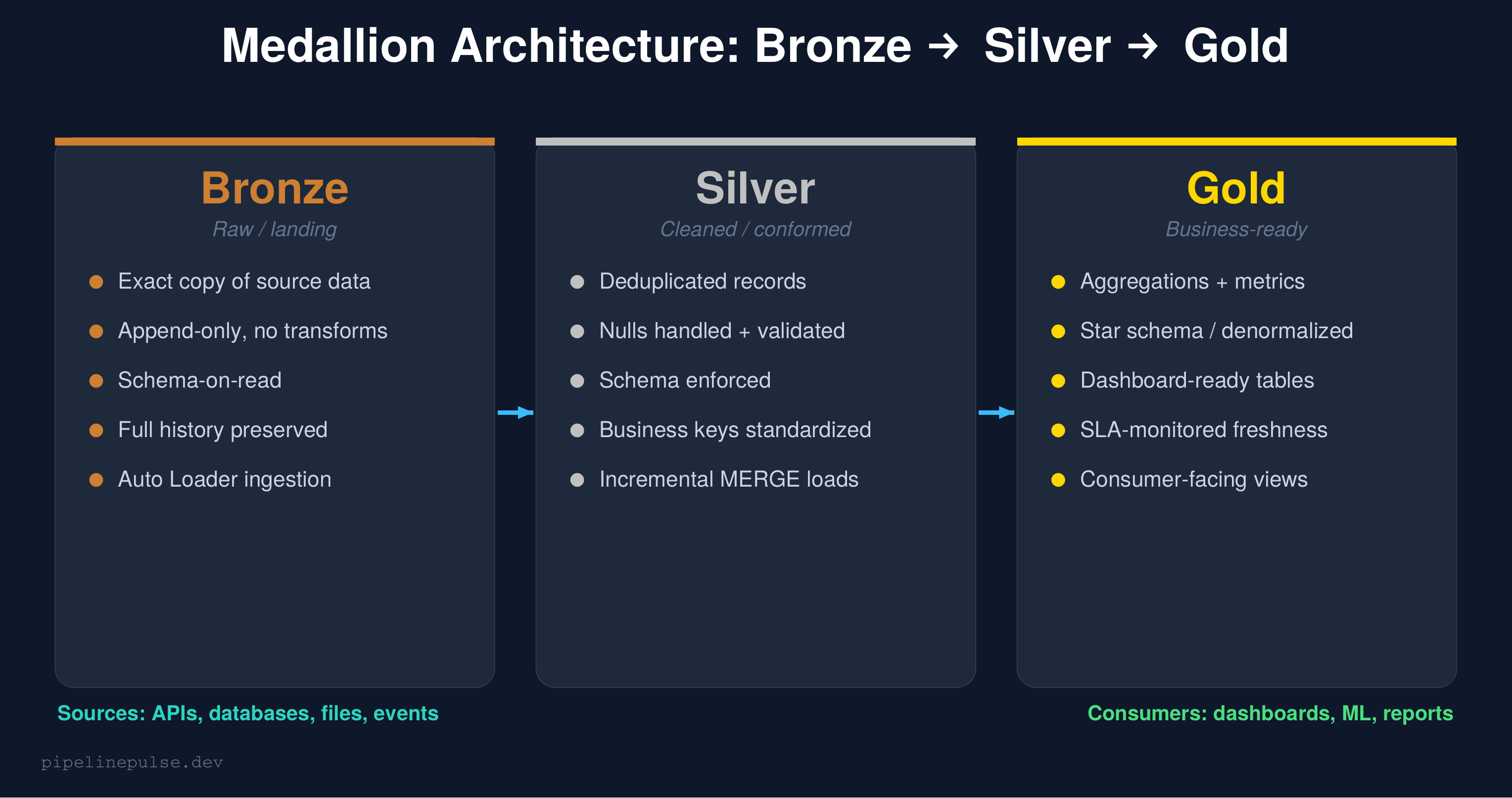
The medallion architecture is a data organization pattern where data moves through progressive layers of quality:
Bronze (raw): An exact copy of source data. No transformations, no cleaning. If the source sends garbage, bronze stores garbage — intentionally. This preserves the original data for auditing and reprocessing.
Silver (cleaned): Deduplicated, validated, schema-enforced data. This is where you fix nulls, standardize formats, apply business rules, and resolve data quality issues. Most of your engineering effort happens here.
Gold (business-ready): Aggregated, denormalized tables optimized for specific consumers — dashboards, reports, ML models. Gold tables answer business questions directly.
The key principle: each layer has a single responsibility. Bronze ingests. Silver cleans. Gold serves. Mixing these responsibilities is the #1 mistake teams make.
What Happens at Each Layer
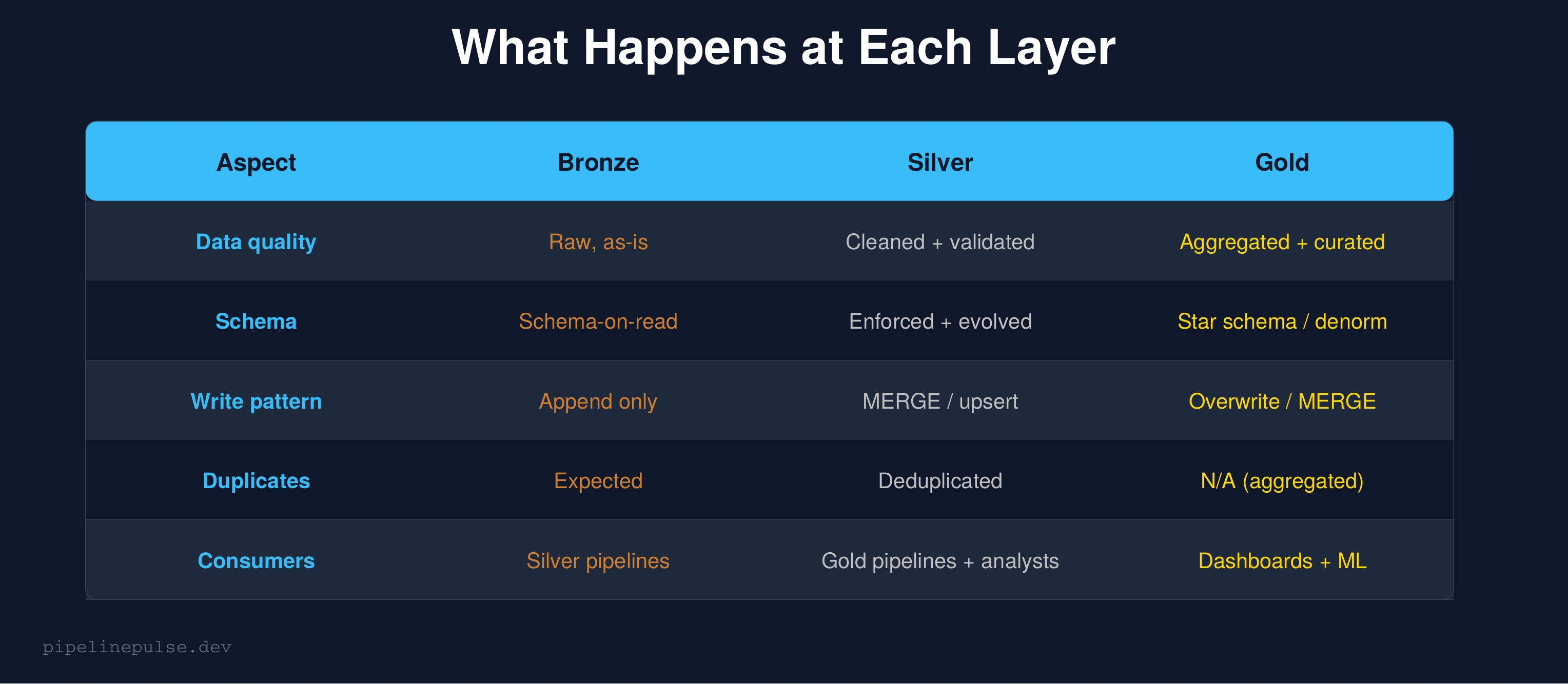
Let me walk through the implementation of each layer with production code.
Bronze Layer: Raw Ingestion
Bronze is the landing zone. The goal is to get data from your sources into Delta tables as quickly and reliably as possible, with zero transformation.
Auto Loader (recommended for files)
# Ingest JSON files from cloud storage
raw_stream = spark.readStream.format('cloudFiles') \
    .option('cloudFiles.format', 'json') \
    .option('cloudFiles.schemaLocation', '/checkpoints/bronze_schema') \
    .option('cloudFiles.inferColumnTypes', 'true') \
    .load('/mnt/landing/orders/')

# Add ingestion metadata
bronze = raw_stream \
    .withColumn('_ingested_at', F.current_timestamp()) \
    .withColumn('_source_file', F.input_file_name())

# Write to bronze — append only, never overwrite
bronze.writeStream.format('delta') \
    .option('checkpointLocation', '/checkpoints/bronze_orders') \
    .option('mergeSchema', 'true') \
    .toTable('catalog.bronze.orders')
For a deeper dive on Auto Loader and streaming ingestion, see my Structured Streaming guide.
JDBC source (for databases)
# Pull from PostgreSQL
raw_df = spark.read.format('jdbc') \
    .option('url', 'jdbc:postgresql://host:5432/db') \
    .option('dbtable', 'public.orders') \
    .option('user', dbutils.secrets.get('jdbc', 'user')) \
    .option('password', dbutils.secrets.get('jdbc', 'password')) \
    .load()

# Add metadata and append
raw_df.withColumn('_ingested_at', F.current_timestamp()) \
    .write.format('delta') \
    .mode('append') \
    .saveAsTable('catalog.bronze.orders')
Bronze rules
- Never transform data in bronze. No cleaning, no filtering, no dedup. If the source sends nulls, bronze has nulls.
- Always append. Never overwrite bronze tables. Append-only preserves history.
- Add metadata columns.
_ingested_atand_source_filehelp debug issues later. - Enable
mergeSchema. Source schemas change — let bronze absorb new columns automatically. Handle the schema evolution in silver.
Silver Layer: Cleaned and Conformed
Silver is where the real engineering happens. Every transformation that makes data reliable goes here.
Deduplication
from pyspark.sql import Window, functions as F

# Read from bronze
bronze_df = spark.table('catalog.bronze.orders')

# Dedup: keep the latest version of each order
w = Window.partitionBy('order_id').orderBy(F.desc('_ingested_at'))
deduped = bronze_df \
    .withColumn('rn', F.row_number().over(w)) \
    .filter(F.col('rn') == 1) \
    .drop('rn')
This is the same dedup pattern using row_number() that I covered in the duplicate records guide. It's the most common transformation in any silver layer.
Null handling and validation
# Handle nulls on required fields
cleaned = deduped \
    .filter(F.col('order_id').isNotNull()) \
    .filter(F.col('customer_id').isNotNull()) \
    .withColumn('amount',
        F.when(F.col('amount').isNull(), F.lit(0.0))
         .otherwise(F.col('amount'))
    ) \
    .withColumn('status',
        F.when(F.col('status').isNull(), F.lit('unknown'))
         .otherwise(F.lower(F.trim(F.col('status'))))
    )
For the complete set of null-handling patterns, see my Null Values in Spark guide.
MERGE into silver (incremental load)
from delta.tables import DeltaTable

# Only process new records since last load
silver_table = DeltaTable.forName(spark, 'catalog.silver.orders')

silver_table.alias('t').merge(
    cleaned.alias('s'),
    't.order_id = s.order_id'
).whenMatchedUpdateAll() \
 .whenNotMatchedInsertAll() \
 .execute()
MERGE gives you idempotent upserts — run it multiple times and you get the same result. This is critical for reliability. See my MERGE INTO guide for advanced patterns.
Silver rules
- Dedup everything. Bronze will have duplicates from re-ingestion, retries, and overlapping loads.
- Enforce schema. Validate types, handle nulls, standardize formats.
- Use MERGE for incremental loads. Don't reprocess the entire table every run.
- Add data quality checks. Validate after every load using the patterns from my Data Quality Checks guide.
Gold Layer: Business-Ready
Gold tables are optimized for consumption. Each gold table answers a specific business question or serves a specific consumer.
Daily aggregation example
-- Gold table: daily order summary
CREATE OR REPLACE TABLE catalog.gold.daily_order_summary AS
SELECT
    DATE(order_date) AS order_date,
    status,
    COUNT(*) AS order_count,
    SUM(amount) AS total_revenue,
    AVG(amount) AS avg_order_value,
    COUNT(DISTINCT customer_id) AS unique_customers
FROM catalog.silver.orders
GROUP BY DATE(order_date), status
ORDER BY order_date DESC
Incremental gold with MERGE
For gold tables that need incremental updates instead of full rebuilds:
# Calculate today's metrics
today_metrics = spark.sql("""
    SELECT
        DATE(order_date) AS order_date,
        status,
        COUNT(*) AS order_count,
        SUM(amount) AS total_revenue,
        AVG(amount) AS avg_order_value,
        COUNT(DISTINCT customer_id) AS unique_customers
    FROM catalog.silver.orders
    WHERE DATE(order_date) >= DATE_SUB(CURRENT_DATE(), 3)
    GROUP BY DATE(order_date), status
""")

# MERGE into gold
gold = DeltaTable.forName(spark, 'catalog.gold.daily_order_summary')
gold.alias('t').merge(
    today_metrics.alias('s'),
    't.order_date = s.order_date AND t.status = s.status'
).whenMatchedUpdateAll() \
 .whenNotMatchedInsertAll() \
 .execute()
Gold rules
- One table per use case.
daily_order_summaryfor the revenue dashboard,customer_lifetime_valuefor the marketing team. Don't build one giant gold table for everything. - Denormalize. Gold tables should be query-ready without joins. Pre-join dimensions into facts.
- Document what each table is for. Add table comments and a data dictionary.
- Monitor freshness. Gold tables have SLAs — dashboards break if the data is stale. Use the patterns from my Data Observability guide.
📄 Get the complete pipeline templates
The Pipeline Architecture Templates has the full medallion pipeline, batch ETL, streaming upserts, and orchestration patterns as copy-paste PySpark code. $4.99
Table Maintenance
Each layer needs regular maintenance to stay performant:
-- Run weekly across all layers
-- Bronze: compact the many small files from streaming ingestion
OPTIMIZE catalog.bronze.orders

-- Silver: compact + Z-ORDER on common filter columns
OPTIMIZE catalog.silver.orders ZORDER BY (order_date, customer_id)

-- Gold: compact (usually fewer files, but still worth running)
OPTIMIZE catalog.gold.daily_order_summary

-- All layers: remove old file versions
VACUUM catalog.bronze.orders RETAIN 168 HOURS
VACUUM catalog.silver.orders RETAIN 168 HOURS
VACUUM catalog.gold.daily_order_summary RETAIN 168 HOURS
See my OPTIMIZE, Z-ORDER, and VACUUM guide for the full maintenance playbook.
Orchestration: Wiring the Layers Together
Use a Databricks Workflow with task dependencies to run the layers in sequence:
{
  "name": "orders_medallion_pipeline",
  "tasks": [
    {
      "task_key": "ingest_bronze",
      "notebook_task": {"notebook_path": "/pipelines/bronze_orders"}
    },
    {
      "task_key": "transform_silver",
      "depends_on": [{"task_key": "ingest_bronze"}],
      "notebook_task": {"notebook_path": "/pipelines/silver_orders"}
    },
    {
      "task_key": "aggregate_gold",
      "depends_on": [{"task_key": "transform_silver"}],
      "notebook_task": {"notebook_path": "/pipelines/gold_orders"}
    },
    {
      "task_key": "quality_checks",
      "depends_on": [{"task_key": "aggregate_gold"}],
      "notebook_task": {"notebook_path": "/pipelines/run_quality_checks"}
    }
  ]
}
Bronze → Silver → Gold → Quality checks. If any step fails, the downstream steps don't run. This prevents bad data from propagating.
Anti-Patterns to Avoid
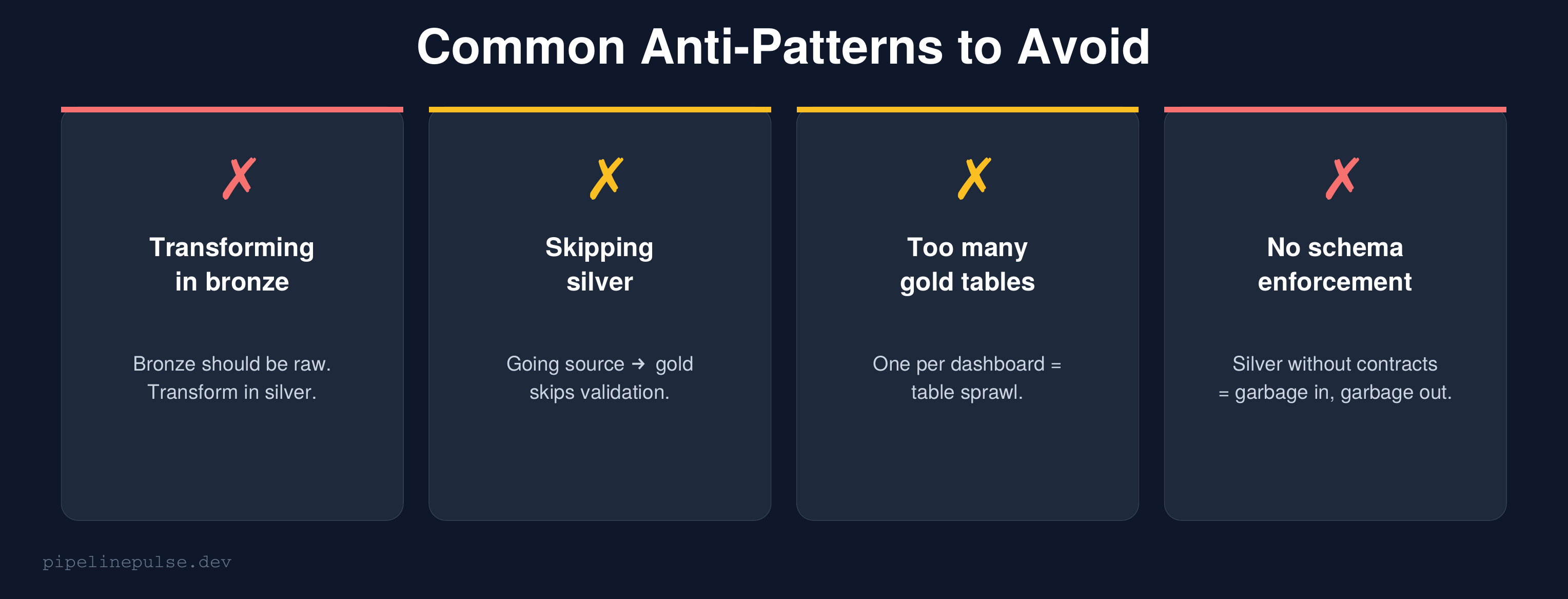
1. Transforming in bronze. Bronze is raw storage. The moment you filter, clean, or transform in bronze, you lose the ability to reprocess from source. Keep bronze untouched.
2. Skipping silver. Going directly from source to gold-level aggregations means you're doing cleaning and aggregation in one step. When something breaks, you can't tell if the problem is bad source data or a bad aggregation. Silver gives you a debuggable middle layer.
3. Too many gold tables. One gold table per dashboard widget is table sprawl. Instead, build gold tables around business domains (orders, customers, products) and let dashboards query them.
4. No schema enforcement in silver. Silver without data contracts or schema validation is just bronze with extra steps. Enforce schemas, validate constraints, and check quality at every silver write.
5. No quality checks between layers. Each layer transition is an opportunity to validate. Bronze → silver should check completeness and uniqueness. Silver → gold should check aggregation correctness.
When NOT to Use Medallion Architecture
Medallion isn't always the right choice:
- Single-table ETL. If you're loading one table from one source with no downstream consumers, three layers is overkill. Just load it.
- Real-time sub-second requirements. Medallion adds latency at each layer. If you need sub-second processing, consider a streaming-first architecture.
- Tiny datasets. If your entire dataset fits in a spreadsheet, don't build a lakehouse. Use a database.
For most production data platforms with 10+ tables and multiple consumers, medallion is the right default.
Common Gotchas
1. Bronze tables growing unbounded. Since bronze is append-only, it grows forever. Set up VACUUM and consider partition-based retention policies for very old data.
2. Silver MERGE getting slow. As silver tables grow, MERGE performance degrades. Z-ORDER on your merge key columns dramatically improves performance.
3. Gold tables not reflecting recent silver changes. If gold is rebuilt on a schedule but silver updates continuously, gold can be stale. Use incremental MERGE for gold instead of full rebuilds.
4. Circular dependencies. Gold table A depends on gold table B which depends on gold table A. Solve this by introducing a staging step or restructuring the dependency graph.
5. Not using time travel for debugging. When gold data looks wrong, time travel each layer backwards to find where the bad data entered. Bronze → silver is usually where problems originate.
Get the Templates
Want ready-to-use code templates for the entire medallion pipeline — bronze ingestion, silver MERGE, gold aggregation, orchestration, and maintenance? Grab the Pipeline Architecture Templates on Gumroad for $4.99.
Also check out:
- Delta Table Troubleshooting Checklist ($9)
- Data Quality Monitoring Playbook ($4.99) — quality checks per layer
- Databricks Debugging Kit ($4.99)
- Structured Streaming Starter Kit ($4.99) — streaming bronze ingestion
- Schema Evolution Quick Reference ($4.99)
Building data pipelines that don't break at 3am? That's what PipelinePulse is about. More guides at pipelinepulse.dev.