
Schema Evolution in Delta Lake: Handling Changes Gracefully
Master Delta Lake schema evolution — mergeSchema, overwriteSchema, column mapping, type widening, and streaming schema changes. Includes a decision guide, 4 migration patterns, and 7 common gotchas from production experience.

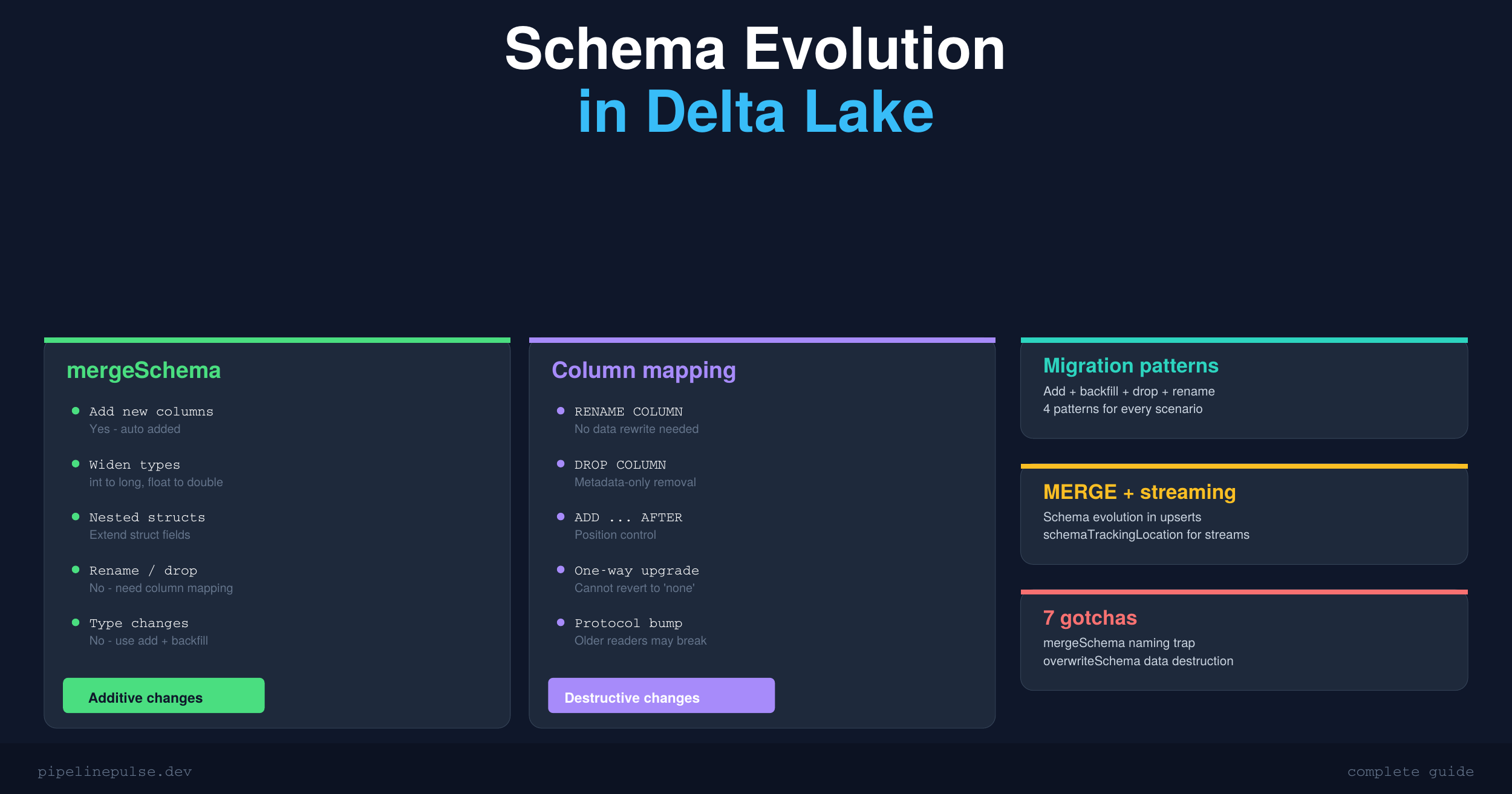
Your source system just added three new columns. Your ETL pipeline immediately fails with a schema mismatch error. Sound familiar?
Schema changes are inevitable in production data pipelines. Source systems evolve, business requirements shift, and new fields get added constantly. The question isn't whether your schema will change — it's whether your pipeline handles it gracefully or falls over at 2am.
Delta Lake has built-in tools for this, but the options are confusing. mergeSchema, overwriteSchema, column mapping, type widening — each does something different, and using the wrong one can either silently corrupt your data or unnecessarily rewrite your entire table.
This guide covers every schema evolution scenario you'll face, with the exact commands to handle each one safely.
Schema Enforcement vs Schema Evolution
Delta Lake validates every write against the target table's schema. By default, this validation is strict — if the incoming data doesn't match, the write fails. This is called schema enforcement, and it's a feature, not a bug. It prevents accidental data corruption.
Schema evolution is the opt-in ability to let the target schema automatically update when the source schema changes.
# Schema enforcement (default) — this FAILS if df has new columns
df.write.format('delta') \
    .mode('append') \
    .saveAsTable('catalog.schema.my_table')

# Schema evolution — this SUCCEEDS and adds new columns automatically
df.write.format('delta') \
    .mode('append') \
    .option('mergeSchema', 'true') \
    .saveAsTable('catalog.schema.my_table')
The key decision: use enforcement on production tables where schema stability matters, and evolution on ingestion pipelines where sources change frequently.
Three Ways to Enable Schema Evolution
Option A: Per-write (recommended for most cases)
# Append with new columns
df.write.format('delta') \
    .mode('append') \
    .option('mergeSchema', 'true') \
    .saveAsTable('catalog.schema.my_table')
This is the safest approach because you explicitly opt in on each write. You control exactly which writes are allowed to change the schema.
Option B: Session-level
# All writes in this session can evolve schemas
spark.conf.set('spark.databricks.delta.schema.autoMerge.enabled', 'true')
Useful for notebooks that process multiple tables with evolving schemas. Be careful — this applies to ALL writes in the session, not just the one you're thinking about.
Option C: Table property (permanent)
ALTER TABLE catalog.schema.my_table
SET TBLPROPERTIES ('delta.autoOptimize.autoCompact' = 'true')
I generally avoid this for production tables. It means any write from any pipeline can change the schema without explicit opt-in. That's fine for bronze/raw tables but risky for silver and gold.
What mergeSchema Can and Can't Do
This is where most people get confused. The name "mergeSchema" is misleading — it doesn't actually merge schemas. It only adds.
| Change | mergeSchema handles it? | What to do instead |
|---|---|---|
| Add new column | Yes — auto-added, existing rows get null | Just set mergeSchema = true |
| Widen type (int → long) | Yes — safe implicit widening | Automatic with mergeSchema |
| Narrow type (long → int) | No — rejected, lossy | Cast in source or use overwriteSchema |
| Change type (string → int) | No — incompatible types | Add new column + backfill + drop old |
| Rename column | No — treated as drop + add | Enable column mapping |
| Drop column | No — ignored | Enable column mapping |
| Reorder columns | No — order fixed at creation | Enable column mapping |
| Add nested struct field | Yes — struct fields can be extended | Works with mergeSchema |
The takeaway: mergeSchema is great for additive changes. For anything destructive (renames, drops, type changes), you need column mapping or a workaround.
📄 Keep this decision guide handy
Get the Schema Evolution Quick Reference — the decision guide, type widening table, migration patterns, and gotchas in a printable 6-page PDF. $4.99
Safe Type Widening
Delta Lake allows these implicit type promotions with mergeSchema:
| From | To | Notes |
|---|---|---|
| byte | short, int, long, float, double, decimal | Safe |
| short | int, long, float, double, decimal | Safe |
| int | long, double, decimal | Safe — but int → float can lose precision for large values |
| long | double, decimal | Safe — but long → float loses precision for values > 16.7M |
| float | double | Safe |
| date | timestamp | Safe |
One gotcha: int or long to float can silently lose precision for large numbers because float only has ~7 digits of precision. If your column has values like 123456789, a float will round it to 123456792. Prefer double or decimal for large numbers.
Column Mapping: Rename and Drop Without Rewriting Data
Column mapping is the feature that unlocks renames and drops. It decouples logical column names from physical Parquet field names, so you can rename a column in the metadata without touching the actual data files.
Enable column mapping
ALTER TABLE catalog.schema.my_table
SET TBLPROPERTIES (
    'delta.columnMapping.mode' = 'name',
    'delta.minReaderVersion' = '2',
    'delta.minWriterVersion' = '5'
)
This is a one-way upgrade. You cannot go back to 'none' mode after enabling column mapping. It also bumps the table protocol version, which means older Spark readers might not be able to read the table. Make sure your team is ready before flipping this switch.
Rename columns
-- Simple rename
ALTER TABLE my_table RENAME COLUMN old_name TO new_name

-- Rename nested struct field
ALTER TABLE my_table RENAME COLUMN address.zip TO address.postal_code
Drop columns
-- Drop a single column
ALTER TABLE my_table DROP COLUMN temp_column

-- Drop multiple columns
ALTER TABLE my_table DROP COLUMNS (col_a, col_b, col_c)
Dropped columns are removed from metadata only. The data still exists in the Parquet files until you run VACUUM. This means time travel queries can still access dropped columns — which is useful for recovery but something to be aware of if you're dropping columns for compliance reasons.
For a deeper dive into VACUUM and table maintenance, check my guide on OPTIMIZE, Z-ORDER, and VACUUM.
Add columns with position control
-- Add after a specific column
ALTER TABLE my_table ADD COLUMN middle_name STRING AFTER first_name

-- Add as the first column
ALTER TABLE my_table ADD COLUMN row_id BIGINT FIRST

-- Add nested field to existing struct
ALTER TABLE my_table ADD COLUMN address.country STRING AFTER address.city
Schema Evolution with MERGE INTO
If you use MERGE INTO for upserts (and you should), schema evolution works but with one important catch.
# Enable auto-merge for the session
spark.conf.set('spark.databricks.delta.schema.autoMerge.enabled', 'true')

from delta.tables import DeltaTable

target = DeltaTable.forName(spark, 'catalog.schema.my_table')
target.alias('t').merge(
    source_df.alias('s'), 't.id = s.id'
).whenMatchedUpdateAll() \
 .whenNotMatchedInsertAll() \
 .execute()
The catch: UPDATE SET * and INSERT * trigger schema evolution. Explicit column lists do not.
# This DOES trigger schema evolution (new columns auto-added):
.whenMatchedUpdateAll()
.whenNotMatchedInsertAll()

# This does NOT trigger schema evolution:
.whenMatchedUpdate(set={"name": "s.name", "email": "s.email"})
.whenNotMatchedInsert(values={"id": "s.id", "name": "s.name"})
If you're using explicit column mappings in your MERGE (which is common in SCD Type 2 implementations), new columns in the source will be silently ignored. You need to update the column lists manually when the source schema changes.
This is exactly the kind of problem data contracts solve — the producer notifies you about schema changes before they happen.
Schema Evolution with Structured Streaming
Streaming pipelines are especially sensitive to schema changes because they run continuously. A schema change in the source can crash your stream.
# Read stream with schema evolution (Databricks Runtime 15.2+)
df = spark.readStream.format('delta') \
    .option('schemaTrackingLocation', '/path/to/_schema_log') \
    .table('catalog.schema.source_table')

# Write stream with mergeSchema
df.writeStream.format('delta') \
    .option('checkpointLocation', '/path/to/checkpoint') \
    .option('mergeSchema', 'true') \
    .toTable('catalog.schema.target_table')
The schemaTrackingLocation option (available in DBR 15.2+) lets the streaming query automatically detect upstream schema changes and adapt without a manual restart. Without it, the stream fails on schema change and you have to restart it manually.
Common Migration Patterns
Pattern 1: Add column with default backfill
The simplest case — you need a new column and want to populate it for existing rows:
ALTER TABLE my_table ADD COLUMN status STRING

UPDATE my_table SET status = 'active' WHERE status IS NULL
Pattern 2: Incompatible type change (add + backfill + drop + rename)
You can't change price from STRING to DOUBLE directly. Instead:
-- 1. Add new column with correct type
ALTER TABLE my_table ADD COLUMN price_v2 DOUBLE

-- 2. Backfill from old column
UPDATE my_table SET price_v2 = CAST(price AS DOUBLE)

-- 3. Drop old column (requires column mapping)
ALTER TABLE my_table DROP COLUMN price

-- 4. Rename new column (requires column mapping)
ALTER TABLE my_table RENAME COLUMN price_v2 TO price
Always validate the cast on a sample before running the full UPDATE. If your source has values like "N/A" or empty strings, CAST will produce nulls — which might violate your data quality checks. Speaking of which, handling nulls properly is critical during migrations — see my null values in Spark guide for the full set of patterns.
Pattern 3: Full schema replacement (nuclear option)
new_df.write.format('delta') \
    .mode('overwrite') \
    .option('overwriteSchema', 'true') \
    .saveAsTable('catalog.schema.my_table')
overwriteSchema replaces the ENTIRE schema AND all existing data. Use only when you intentionally want a clean break. This is not an in-place schema alter — it's a full table replacement.
Pattern 4: Pre-write schema diff
Catch surprises before they happen:
from delta.tables import DeltaTable

target_schema = DeltaTable.forName(spark, 'my_table').toDF().schema
source_schema = source_df.schema

new_cols = set(source_schema.fieldNames()) - set(target_schema.fieldNames())
missing_cols = set(target_schema.fieldNames()) - set(source_schema.fieldNames())

if new_cols:
    print(f"New columns in source: {new_cols}")
if missing_cols:
    print(f"Columns missing from source: {missing_cols}")
This is a lightweight version of what data contracts formalize — checking the schema before writing instead of discovering issues after.
Quick Decision Guide
| I need to... | Use this | Requires |
|---|---|---|
| Add new columns on write | mergeSchema = true |
Nothing extra |
| Replace entire schema | overwriteSchema = true |
Nothing (destructive) |
| Auto-evolve all writes | autoMerge.enabled = true |
Session or table config |
| Rename a column | ALTER TABLE RENAME COLUMN |
Column mapping = name |
| Drop a column | ALTER TABLE DROP COLUMN |
Column mapping = name |
| Change column order | ALTER TABLE ... AFTER/FIRST |
Column mapping = name |
| Change type (compatible) | mergeSchema = true |
Automatic widening |
| Change type (incompatible) | Add + backfill + drop + rename | Column mapping = name |
| Evolve schema in MERGE | autoMerge + UPDATE/INSERT * |
Session config |
| Evolve schema in streaming | mergeSchema + schemaTrackingLocation |
DBR 15.2+ |
Common Gotchas
1. mergeSchema doesn't merge — it only adds. It won't rename, drop, or change types. The name is genuinely misleading.
2. overwriteSchema destroys all existing data. It's a full table replacement, not an in-place schema alter. I've seen people use this thinking it just updates the schema — it doesn't.
3. Enabling column mapping is irreversible. It bumps the protocol version permanently. Older Spark readers may not be able to read the table. Test in dev first.
4. MERGE with explicit column lists doesn't trigger schema evolution. You must use SET * for auto-evolution. If you're using explicit mappings (common in SCD2), you need to update them manually.
5. Dropped columns still exist in Parquet files. Run VACUUM to physically reclaim space. Until then, time travel queries can still see them.
6. Struct evolution is partial. You can add fields to a struct with mergeSchema, but you cannot remove or rename struct fields without column mapping.
7. Streaming schema evolution requires schemaTrackingLocation. Without it on DBR 15.2+, the stream fails on schema change and needs a manual restart.
If schema management feels overwhelming, building a stronger Spark and Delta Lake foundation helps everything click. DataCamp has a structured learning path for Delta Lake and Databricks that covers these concepts from the ground up.
Get the Quick Reference
Want all of this in a printable 6-page PDF with the decision guide, type widening table, migration patterns, and gotchas list? Grab the Schema Evolution Quick Reference on Gumroad for $4.99.
Also check out the rest of the PipelinePulse resources:
- Delta Table Troubleshooting Checklist ($9)
- PySpark Window Functions Cheat Sheet ($4.99)
- Data Quality Monitoring Playbook ($4.99)
- Pipeline Architecture Templates ($4.99)
- Databricks Debugging Kit ($4.99)
Building data pipelines that don't break at 3am? That's what PipelinePulse is about. More guides at pipelinepulse.dev.