Apache Spark Structured Streaming for Beginners
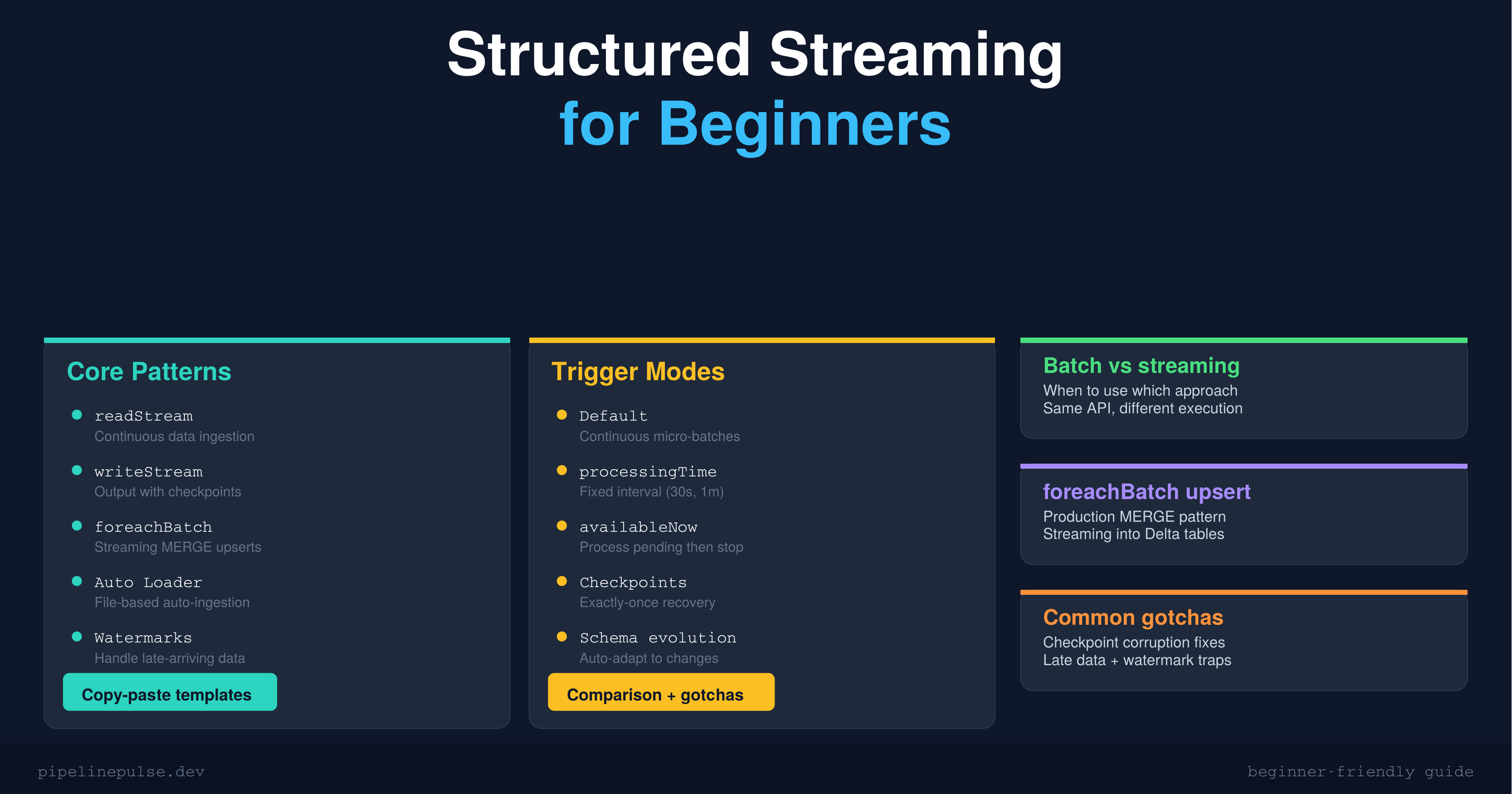
Build your first Spark Structured Streaming pipeline in Databricks. Covers readStream, writeStream, trigger modes, foreachBatch MERGE upserts, Auto Loader for file ingestion, and watermarks for late data — beginner-friendly with copy-paste code templates.

Streaming sounds intimidating. Continuous data, micro-batches, checkpoints, watermarks, exactly-once semantics — the terminology alone is enough to make you stick with batch ETL forever.
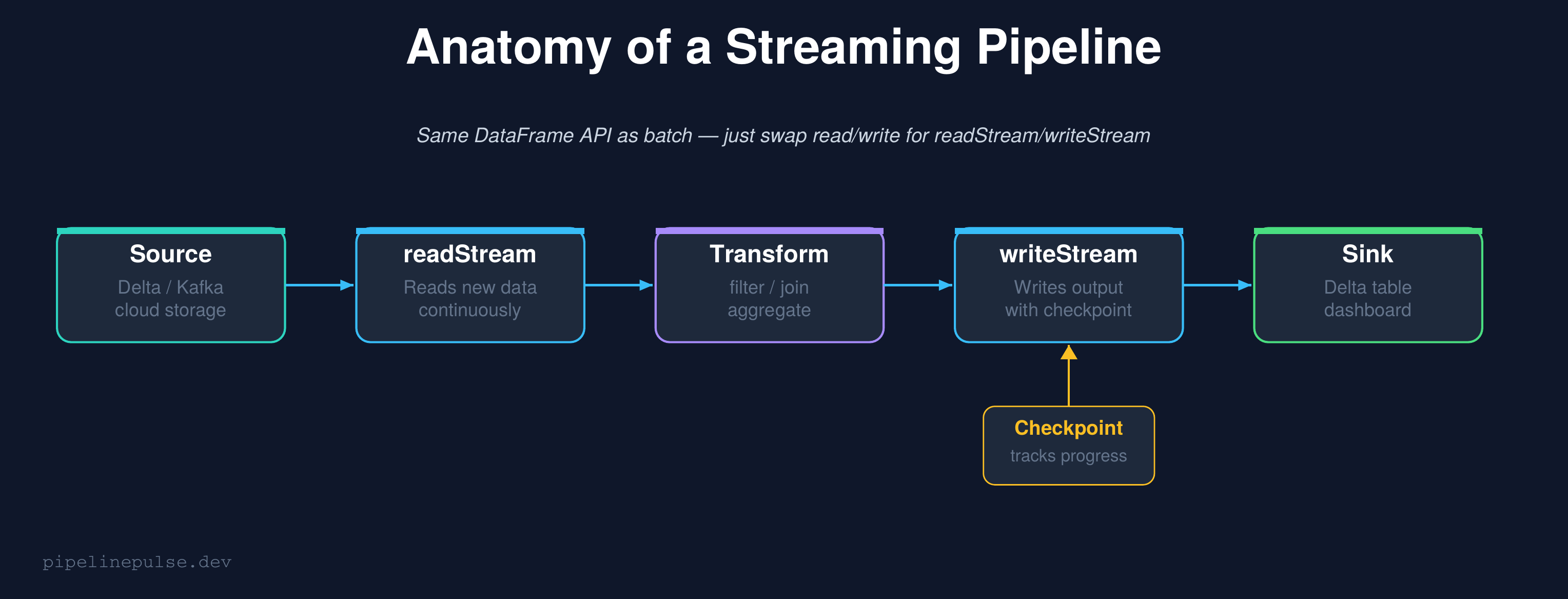
Here's the thing: if you already know PySpark DataFrames, you already know 80% of structured streaming. The API is nearly identical — you swap spark.read for spark.readStream and .write for .writeStream. That's the core of it.
This guide strips away the complexity and shows you how to build your first streaming pipeline in Databricks, step by step. No prior streaming experience needed.
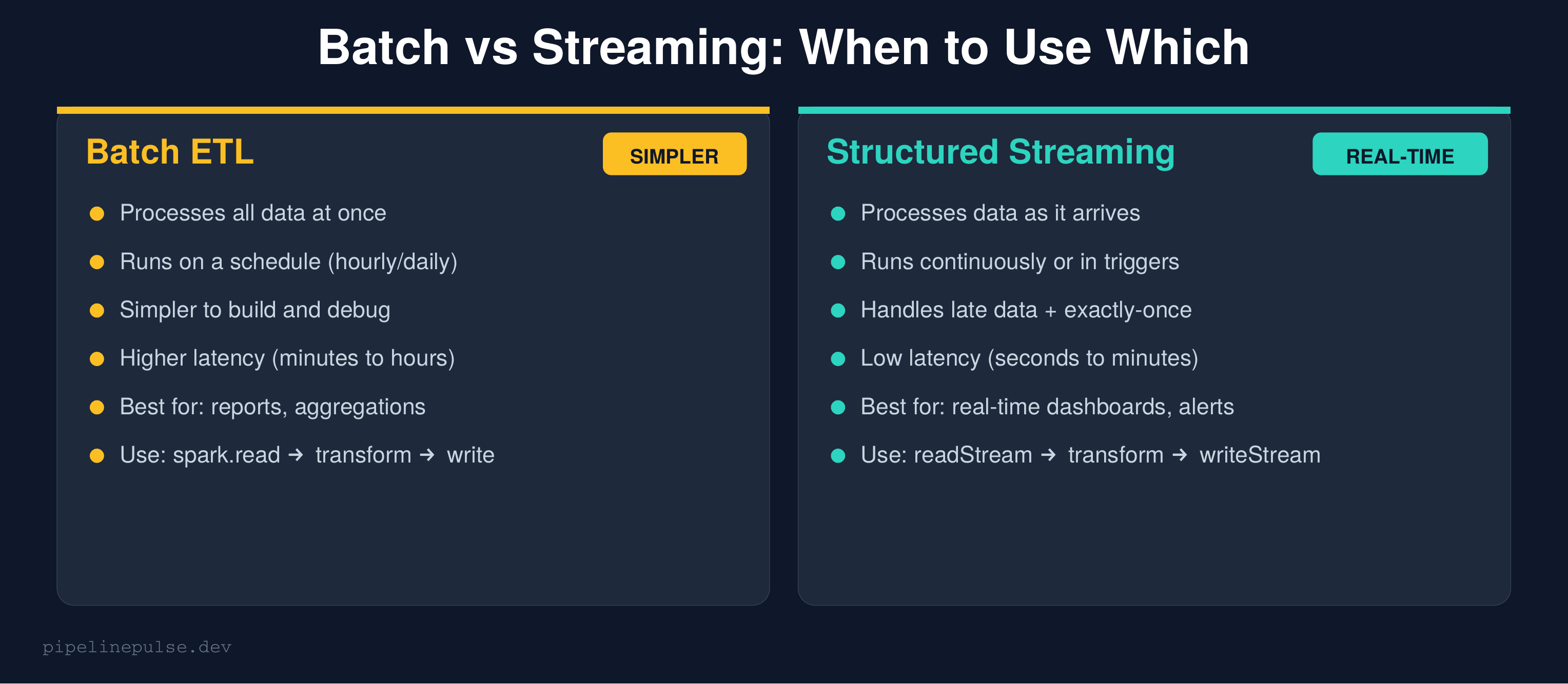
Batch vs Streaming: When to Use Which
Before diving in, let's be clear about when you actually need streaming.
Use batch when:
- Your consumers can wait minutes to hours for fresh data
- You're building daily/weekly reports or aggregations
- Your data sources update on a schedule (daily dumps, hourly exports)
- You want the simplest possible pipeline
Use streaming when:
- You need data available in seconds to minutes
- You're building real-time dashboards, alerting, or fraud detection
- Your sources produce data continuously (event logs, IoT sensors, CDC)
- You want incremental processing (only process new data, not the full table)
Most teams should start with batch and only move to streaming when the latency requirement demands it. Don't stream for the sake of streaming.
How Structured Streaming Works
Structured Streaming treats a live data stream as an unbounded table that grows continuously. New data arriving is like new rows being appended to that table. Your query runs against this ever-growing table, and Spark handles all the complexity of tracking what's new.
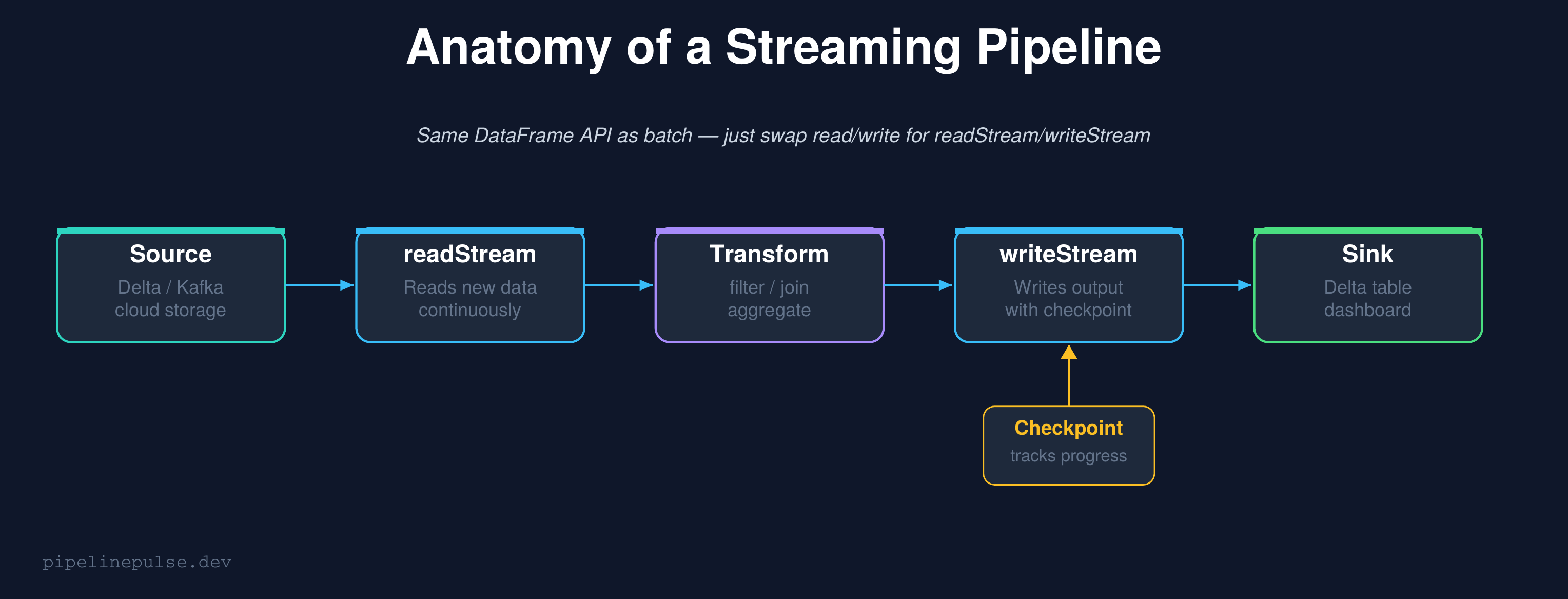
The key insight: the transformation code is identical to batch. Filters, joins, aggregations, window functions — they all work the same way. The only difference is how you read and write.
# BATCH (what you already know)
df = spark.read.format('delta').table('bronze.events')
result = df.filter(F.col('event_type').isNotNull())
result.write.format('delta').mode('overwrite').saveAsTable('silver.events')

# STREAMING (same logic, different read/write)
df = spark.readStream.format('delta').table('bronze.events')
result = df.filter(F.col('event_type').isNotNull())
result.writeStream.format('delta') \
    .option('checkpointLocation', '/checkpoints/silver_events') \
    .toTable('silver.events')
That's it. The transformation in the middle (filter) didn't change at all.
Your First Streaming Pipeline
Let's build a complete, working pipeline. We'll read from a Delta bronze table, transform the data, and write to a silver table.
Step 1: Read the stream
from pyspark.sql import functions as F

# Read new rows from the bronze table as they arrive
stream = spark.readStream.format('delta') \
    .table('catalog.bronze.events')
That's all. Spark will track which rows are new and only process them.
Step 2: Transform (same as batch)
# Clean and enrich — identical to your batch code
transformed = stream \
    .filter(F.col('event_type').isNotNull()) \
    .filter(F.col('user_id').isNotNull()) \
    .withColumn('processed_at', F.current_timestamp()) \
    .withColumn('event_date', F.to_date('event_time'))
Step 3: Write the stream
# Write to silver table with a checkpoint
query = transformed.writeStream \
    .format('delta') \
    .outputMode('append') \
    .option('checkpointLocation', '/checkpoints/silver_events') \
    .toTable('catalog.silver.events')

# Wait for the stream to finish (or run forever)
query.awaitTermination()
The checkpoint is critical
The checkpointLocation is what makes streaming reliable. It tracks exactly which data has been processed. If the stream crashes and restarts, it picks up from where it left off — no duplicate processing, no data loss.
Rules for checkpoints:
- Every streaming query needs its own unique checkpoint path
- Never share a checkpoint between different queries
- Don't delete the checkpoint unless you want to reprocess everything
- Store it in cloud storage (DBFS, S3, ADLS), not local disk
📄 Get all streaming templates in one PDF
The Structured Streaming Starter Kit has readStream, writeStream, all trigger modes, foreachBatch upserts, Auto Loader, and watermark patterns ready to copy-paste. $4.99
Trigger Modes: How Often to Process
By default, a streaming query processes data as fast as possible in continuous micro-batches. But you can control the frequency with triggers.
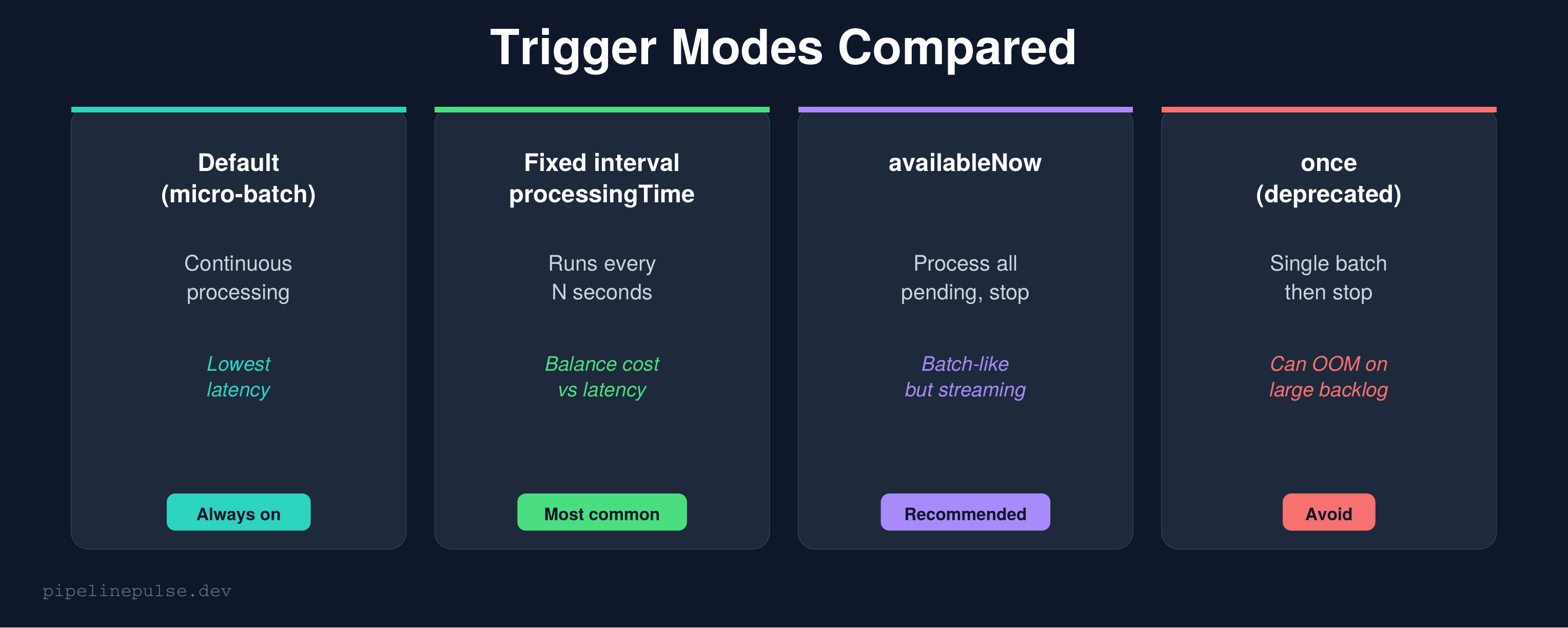
Fixed interval (most common for production)
# Process every 30 seconds
query = transformed.writeStream \
    .format('delta') \
    .trigger(processingTime='30 seconds') \
    .option('checkpointLocation', '/checkpoints/silver_events') \
    .toTable('catalog.silver.events')
This is the sweet spot for most production pipelines. You get near-real-time data (30-second lag) without burning compute continuously. Adjust the interval based on your latency requirement — 10 seconds for dashboards, 5 minutes for non-urgent tables.
Available now (batch-like, recommended for catch-ups)
# Process ALL pending data, then stop
query = transformed.writeStream \
    .format('delta') \
    .trigger(availableNow=True) \
    .option('checkpointLocation', '/checkpoints/silver_events') \
    .toTable('catalog.silver.events')
availableNow=True processes all data that has accumulated since the last run, then stops. It's like batch but with checkpoint tracking — it only processes new data each time.
This is perfect for scheduled jobs that run every hour. You get the simplicity of batch scheduling with the incremental efficiency of streaming.
Once (deprecated — avoid)
# DON'T USE THIS — use availableNow instead
query = transformed.writeStream \
    .trigger(once=True) \
    .option('checkpointLocation', '/checkpoints/silver_events') \
    .toTable('catalog.silver.events')
once=True tries to process everything in a single batch. If there's a large backlog, it can OOM. availableNow=True processes the same data in multiple batches, which is safer. Always prefer availableNow.
foreachBatch: Streaming MERGE Upserts
The default append output mode just adds new rows. But what if you need to update existing rows — an upsert? That's where foreachBatch comes in.
foreachBatch gives you a regular DataFrame for each micro-batch, and you can do anything with it — including MERGE:
from delta.tables import DeltaTable

def upsert_to_silver(batch_df, batch_id):
    """Upsert each micro-batch into the silver table."""
    if batch_df.isEmpty():
        return

    target = DeltaTable.forName(spark, 'catalog.silver.events')

    target.alias('t').merge(
        batch_df.alias('s'),
        't.event_id = s.event_id'
    ).whenMatchedUpdateAll() \
     .whenNotMatchedInsertAll() \
     .execute()

# Wire it up
query = stream.writeStream \
    .foreachBatch(upsert_to_silver) \
    .option('checkpointLocation', '/checkpoints/silver_upsert') \
    .trigger(availableNow=True) \
    .start()
This is the production-standard pattern for streaming into Delta tables. Each micro-batch gets merged into the target — new records are inserted, existing records are updated.
If MERGE syntax is new to you, see my MERGE INTO complete guide.
Important: When using foreachBatch, make sure your source data doesn't have duplicates on the merge key, or the MERGE will fail. Dedup inside the function if needed:
def upsert_to_silver(batch_df, batch_id):
    if batch_df.isEmpty():
        return

    # Dedup within the micro-batch
    from pyspark.sql import Window
    w = Window.partitionBy('event_id').orderBy(F.desc('event_time'))
    deduped = batch_df.withColumn('rn', F.row_number().over(w)) \
                      .filter(F.col('rn') == 1).drop('rn')

    target = DeltaTable.forName(spark, 'catalog.silver.events')
    target.alias('t').merge(
        deduped.alias('s'), 't.event_id = s.event_id'
    ).whenMatchedUpdateAll() \
     .whenNotMatchedInsertAll() \
     .execute()
For more on dedup patterns, check my duplicate records guide.
Auto Loader: File-Based Streaming Ingestion
If your source is files landing in cloud storage (JSON, CSV, Parquet), Auto Loader is the recommended ingestion method. It automatically discovers new files, handles schema evolution, and scales with volume.
# Ingest JSON files from cloud storage
stream = spark.readStream.format('cloudFiles') \
    .option('cloudFiles.format', 'json') \
    .option('cloudFiles.schemaLocation', '/checkpoints/autoloader_schema') \
    .option('cloudFiles.inferColumnTypes', 'true') \
    .load('/mnt/landing/events/')

# Write to bronze
stream.writeStream.format('delta') \
    .option('checkpointLocation', '/checkpoints/bronze_events') \
    .option('mergeSchema', 'true') \
    .toTable('catalog.bronze.events')
Why Auto Loader over manual file listing:
- Automatically discovers new files (no glob patterns to manage)
- Tracks which files have been processed (no duplicates)
- Handles schema evolution automatically with
mergeSchema - Scales to millions of files without performance degradation
For most Databricks users, Auto Loader should be your default ingestion method for file-based sources.
Watermarks: Handling Late Data
Real-world data arrives late. An event that happened at 2:00 PM might not reach your pipeline until 2:15 PM. Watermarks tell Spark how long to wait for late data before closing a window.
# Allow up to 1 hour of late data
windowed = stream \
    .withWatermark('event_time', '1 hour') \
    .groupBy(
        F.window('event_time', '5 minutes'),
        'event_type'
    ).agg(
        F.count('*').alias('event_count'),
        F.countDistinct('user_id').alias('unique_users')
    )

# Must use append mode with watermarks
windowed.writeStream.format('delta') \
    .outputMode('append') \
    .option('checkpointLocation', '/checkpoints/windowed_events') \
    .toTable('catalog.gold.windowed_events')
How watermarks work:
- Spark tracks the maximum event_time it has seen
- Any event older than
max_event_time - 1 houris considered "too late" and dropped - Windows are finalized (emitted) once the watermark passes their end time
When you need watermarks:
- Windowed aggregations (GROUP BY with time windows)
- Stream-stream joins
- Any operation where late data could produce incorrect results
When you don't need them:
- Simple append-only pipelines (filter + transform + write)
- foreachBatch upserts (the MERGE handles updates anyway)
Monitoring Your Stream
A running stream needs monitoring. Here's how to check on it:
# Check stream status
query.status
# Returns: {'message': 'Processing new data', 'isDataAvailable': True, ...}

# Check progress metrics
query.lastProgress
# Returns: processingTime, numInputRows, inputRowsPerSecond, ...

# In a notebook, display the live dashboard
display(query.lastProgress)
For production streams, log these metrics to your observability system and alert on:
- Stream stopped unexpectedly (query.isActive == False)
- Processing time exceeding trigger interval (falling behind)
- Input rows dropping to zero (source stopped sending data)
Common Gotchas
1. Forgetting the checkpoint. Without a checkpoint, a restarted stream reprocesses everything from scratch. Always set checkpointLocation.
2. Using once=True instead of availableNow=True. once processes in a single batch and can OOM on large backlogs. availableNow splits into multiple batches. Always prefer availableNow.
3. Sharing checkpoints between queries. Each streaming query needs its own checkpoint path. Sharing causes corruption and data loss.
4. Not handling nulls in streaming. Null values in key columns cause silent failures in MERGE operations. Filter them out or use null-safe patterns.
5. Using autoscaling for streaming clusters. Streaming needs stable throughput. Autoscaling causes latency spikes as workers scale up and down. Use fixed cluster size for streaming workloads. See my cost optimization guide for more on cluster config.
6. Checkpoint corruption after code changes. Some changes (like modifying the schema of the output) are incompatible with existing checkpoints. If your stream fails after a code change, you may need to delete the checkpoint and reprocess. Use time travel with startingVersion to replay from a known good point.
7. Watermark too tight = data loss. If your watermark is 10 minutes but data regularly arrives 15 minutes late, you'll silently drop late events. Set watermarks based on your actual observed data latency, plus a safety buffer.
Quick Reference
| Task | Code |
|---|---|
| Read stream from Delta | spark.readStream.format('delta').table('t') |
| Write stream to Delta | .writeStream.format('delta').toTable('t') |
| Set checkpoint | .option('checkpointLocation', '/path') |
| Fixed interval trigger | .trigger(processingTime='30 seconds') |
| Process-and-stop trigger | .trigger(availableNow=True) |
| foreachBatch upsert | .foreachBatch(upsert_fn).start() |
| Auto Loader from files | readStream.format('cloudFiles') |
| Add watermark | .withWatermark('col', '1 hour') |
| Check stream status | query.status / query.lastProgress |
| Stop stream | query.stop() |
Get the Starter Kit
Want all these streaming patterns as copy-paste templates in a printable PDF — readStream, writeStream, triggers, foreachBatch upserts, Auto Loader, and watermarks? Grab the Structured Streaming Starter Kit on Gumroad for $4.99.
Also check out:
- Pipeline Architecture Templates ($4.99) — medallion + orchestration patterns
- Databricks Debugging Kit ($4.99) — when streams fail
- Databricks Cost Optimization Checklist ($4.99) — cluster config for streaming
- Data Quality Monitoring Playbook ($4.99)
- Delta Table Troubleshooting Checklist ($9)
Building data pipelines that don't break at 3am? That's what PipelinePulse is about. More guides at pipelinepulse.dev.