Data Observability: Tools and Practices for 2026
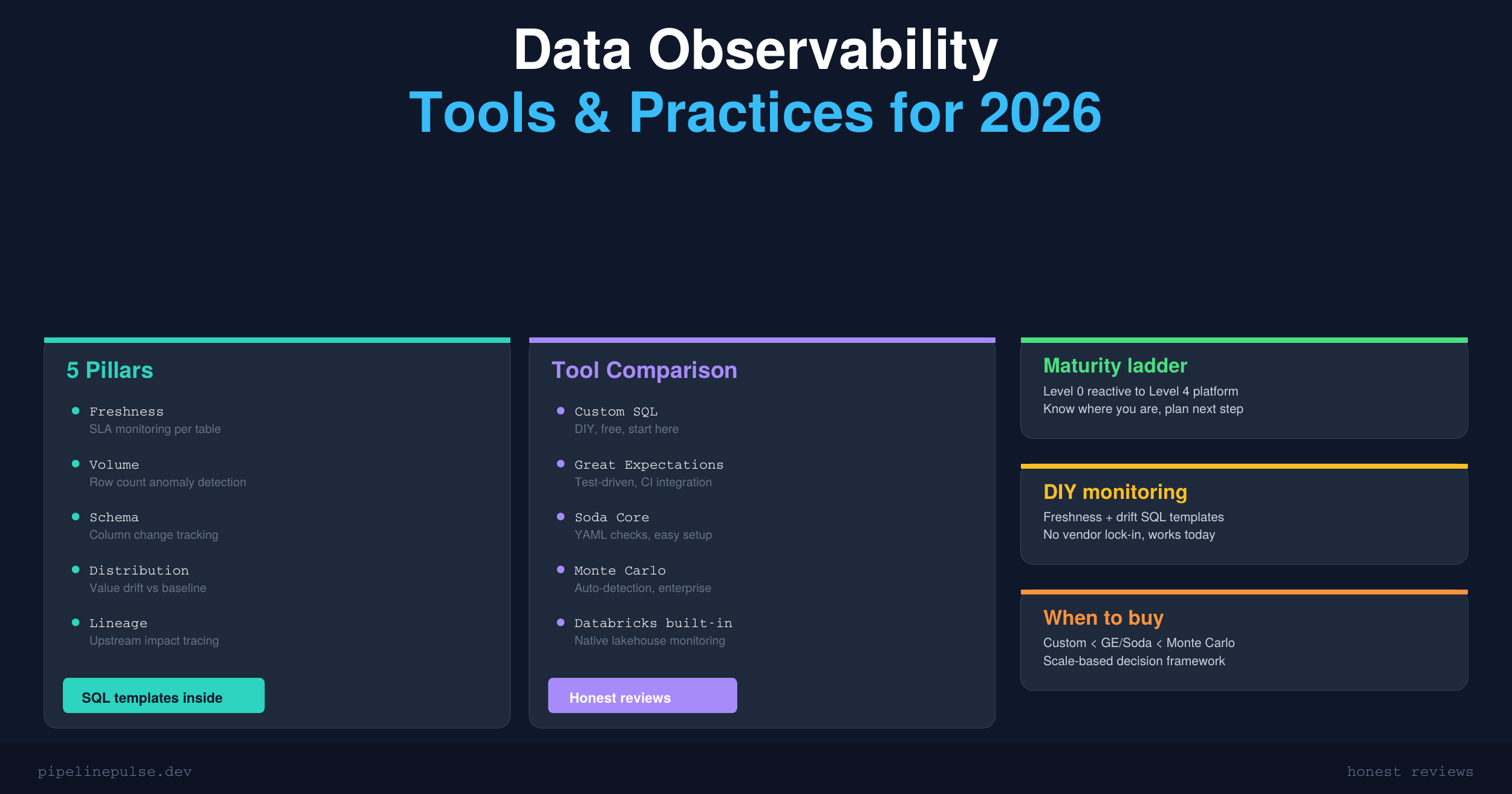
The 5 pillars of data observability, DIY monitoring with SQL templates, tool comparison (Great Expectations, Soda Core, Monte Carlo, Databricks Lakehouse Monitoring), and a maturity ladder for knowing what to build when. Start from zero and scale up.

Your pipeline ran successfully. Green checkmarks across the board. But the data inside is wrong — a column's average shifted by 40%, half the rows have stale timestamps, and nobody noticed until the CEO asked why the revenue dashboard looks off.
This is the problem data observability solves. It's not about whether your pipeline ran — it's about whether the data it produced is actually correct.
In 2026, data observability has gone from a nice-to-have to a baseline expectation. With companies embedding data into AI models and automated decisions, silent data corruption doesn't just break a chart — it breaks trust.
This guide covers the 5 pillars of observability, how to build DIY monitoring with SQL, when to adopt a tool, and a framework for choosing the right one for your scale.
What Is Data Observability?
Data observability is the ability to understand the health of your data at all times — without waiting for someone downstream to tell you something's wrong.
It's the data equivalent of application monitoring. Just like you'd never run a production API without health checks, latency metrics, and error alerts, you shouldn't run production data pipelines without knowing whether the output is fresh, complete, and correct.
The difference from data quality: quality checks validate specific rules (is this column not null? is this value in range?). Observability is broader — it tracks trends, detects anomalies, and gives you visibility across your entire data platform.
If you already have data quality checks in place, observability is the next level up. If you don't, start with quality checks first — my Data Quality Monitoring Playbook covers the foundation.
The 5 Pillars of Data Observability
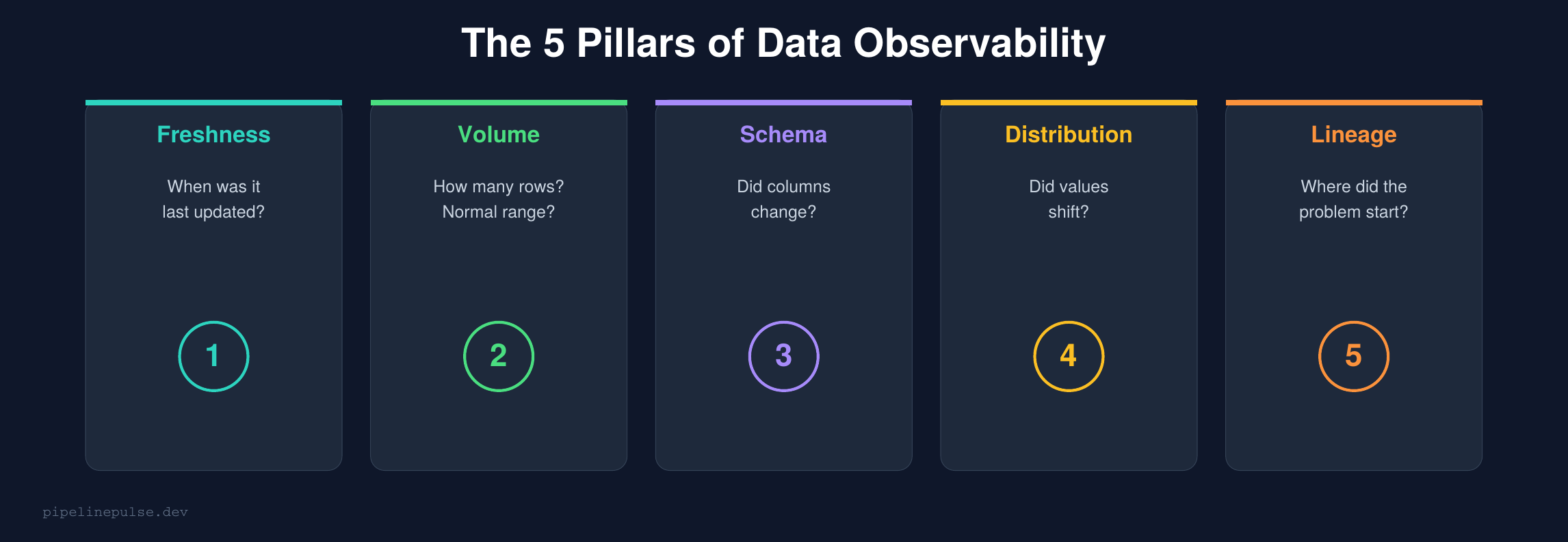
Every observability system monitors these five dimensions:
1. Freshness
Question: When was this table last updated? Is it within the expected SLA?
This is the most impactful pillar to implement first. Stale data is the #1 silent failure in data platforms — the pipeline didn't fail, it just didn't run (or ran with empty results).
-- Freshness check across critical tables
WITH table_freshness AS (
    SELECT 'silver.orders' AS table_name,
        MAX(updated_at) AS latest_record, 4 AS sla_hours
    FROM catalog.silver.orders
    UNION ALL
    SELECT 'silver.customers',
        MAX(updated_at), 24
    FROM catalog.silver.customers
    UNION ALL
    SELECT 'silver.events',
        MAX(updated_at), 1
    FROM catalog.silver.events
)
SELECT
    table_name, latest_record,
    TIMESTAMPDIFF(HOUR, latest_record, CURRENT_TIMESTAMP()) AS hours_stale,
    sla_hours,
    CASE
        WHEN TIMESTAMPDIFF(HOUR, latest_record, CURRENT_TIMESTAMP()) > sla_hours * 2
            THEN 'CRITICAL'
        WHEN TIMESTAMPDIFF(HOUR, latest_record, CURRENT_TIMESTAMP()) > sla_hours
            THEN 'WARNING'
        ELSE 'OK'
    END AS status
FROM table_freshness
ORDER BY hours_stale DESC
Run this on a schedule (hourly or daily) and alert on WARNING/CRITICAL. This single query catches more issues than most teams realize.
📄 Get the complete monitoring toolkit
The Data Observability Toolkit has all the SQL templates, audit table DDL, freshness dashboards, and drift detection queries in a printable PDF. $4.99
2. Volume
Question: Did the expected number of rows arrive? Is it within normal range?
A pipeline that loads 0 rows but succeeds is a common silent failure. Volume monitoring catches it.
-- Compare today's load against rolling 7-day average
WITH daily_counts AS (
    SELECT DATE(load_timestamp) AS load_date, COUNT(*) AS row_count
    FROM catalog.silver.orders
    GROUP BY DATE(load_timestamp)
    ORDER BY load_date DESC
    LIMIT 8
)
SELECT
    load_date, row_count,
    AVG(row_count) OVER (
        ORDER BY load_date ROWS BETWEEN 7 PRECEDING AND 1 PRECEDING
    ) AS avg_previous_7d,
    ABS(row_count - AVG(row_count) OVER (
        ORDER BY load_date ROWS BETWEEN 7 PRECEDING AND 1 PRECEDING
    )) / NULLIF(AVG(row_count) OVER (
        ORDER BY load_date ROWS BETWEEN 7 PRECEDING AND 1 PRECEDING
    ), 0) * 100 AS pct_deviation
FROM daily_counts
ORDER BY load_date DESC
-- ALERT if pct_deviation > 30%
If you're comfortable with PySpark window functions, you can build even more sophisticated volume tracking with rolling averages and standard deviation bands.
3. Schema
Question: Did the table's structure change? Were columns added, removed, or renamed?
Schema changes are one of the most disruptive failures — they can break every downstream pipeline silently. This is why data contracts are becoming essential in 2026.
-- Check schema against expected contract
DESCRIBE TABLE catalog.silver.orders
-- Compare output against your documented schema
-- Alert on: unexpected new columns, missing columns, type changes
For a deeper dive on handling schema changes safely, see my guide on schema evolution in Delta Lake.
4. Distribution
Question: Did the statistical properties of the data shift? Did averages, nulls, or value distributions change unexpectedly?
This is the hardest pillar to implement DIY but catches the sneakiest problems — the data looks structurally fine but the values are wrong.
-- Compare today's distribution against 7-day baseline
WITH today AS (
    SELECT
        AVG(amount) AS avg_amount,
        STDDEV(amount) AS stddev_amount,
        PERCENTILE(amount, 0.5) AS median_amount,
        SUM(CASE WHEN amount IS NULL THEN 1 ELSE 0 END) * 100.0
            / COUNT(*) AS null_pct
    FROM silver.orders
    WHERE DATE(order_date) = CURRENT_DATE()
), baseline AS (
    SELECT
        AVG(amount) AS avg_amount,
        STDDEV(amount) AS stddev_amount
    FROM silver.orders
    WHERE order_date >= DATE_SUB(CURRENT_DATE(), 7)
        AND order_date < CURRENT_DATE()
)
SELECT
    t.avg_amount AS today_avg,
    b.avg_amount AS baseline_avg,
    ABS(t.avg_amount - b.avg_amount) / NULLIF(b.avg_amount, 0) * 100
        AS avg_drift_pct,
    t.null_pct AS today_null_pct
FROM today t, baseline b
-- ALERT if avg_drift_pct > 25% or null_pct spikes
5. Lineage
Question: When something breaks, which upstream table caused it? What downstream tables are affected?
Lineage is about understanding dependencies. When your gold table has bad data, lineage tells you whether the problem originated in bronze ingestion, silver transformation, or an upstream source system.
-- Quick lineage check using Delta Lake history
DESCRIBE HISTORY catalog.silver.orders LIMIT 10
-- Shows: who wrote, when, what operation, which notebook

-- Cross-reference with upstream
DESCRIBE HISTORY catalog.bronze.raw_orders LIMIT 10
-- Compare timestamps to trace where the bad data entered
For production lineage at scale, you'll eventually need a tool (see the comparison below). But Delta Lake time travel combined with DESCRIBE HISTORY handles basic lineage investigation well.
Building DIY Monitoring
You don't need an expensive tool to start. Here's a practical monitoring system built entirely with SQL and Delta tables.
Step 1: Create an audit table
CREATE TABLE IF NOT EXISTS catalog.meta.observability_log (
    check_id STRING,
    table_name STRING,
    check_type STRING,
    metric_name STRING,
    metric_value DOUBLE,
    threshold DOUBLE,
    status STRING,
    checked_at TIMESTAMP,
    details STRING
)
Step 2: Log check results after each pipeline run
from pyspark.sql import functions as F
from datetime import datetime
import uuid

def log_freshness_check(table_name, freshness_col, sla_hours):
    df = spark.table(table_name)
    latest = df.agg(F.max(freshness_col)).collect()[0][0]
    hours_stale = (datetime.now() - latest).total_seconds() / 3600 if latest else 999

    status = "OK" if hours_stale <= sla_hours else \
             "WARNING" if hours_stale <= sla_hours * 2 else "CRITICAL"

    spark.sql(f"""
        INSERT INTO catalog.meta.observability_log VALUES (
            '{uuid.uuid4()}', '{table_name}', 'freshness',
            'hours_stale', {round(hours_stale, 1)}, {sla_hours},
            '{status}', current_timestamp(),
            'Latest record: {latest}'
        )
    """)
    return status

# Run after each pipeline load
log_freshness_check('catalog.silver.orders', 'updated_at', 4)
log_freshness_check('catalog.silver.customers', 'updated_at', 24)
log_freshness_check('catalog.silver.events', 'event_time', 1)
Step 3: Build a dashboard query
-- Observability dashboard: latest status per table
SELECT
    table_name,
    check_type,
    metric_value,
    threshold,
    status,
    checked_at,
    details
FROM (
    SELECT *,
        ROW_NUMBER() OVER (
            PARTITION BY table_name, check_type
            ORDER BY checked_at DESC
        ) AS rn
    FROM catalog.meta.observability_log
) WHERE rn = 1
ORDER BY
    CASE status WHEN 'CRITICAL' THEN 1 WHEN 'WARNING' THEN 2 ELSE 3 END,
    table_name
Wire this into a Databricks SQL dashboard or query it from a scheduled notebook that sends Slack alerts on non-OK statuses.
Tool Comparison
At some point, DIY monitoring doesn't scale. Here's when to consider each tool:
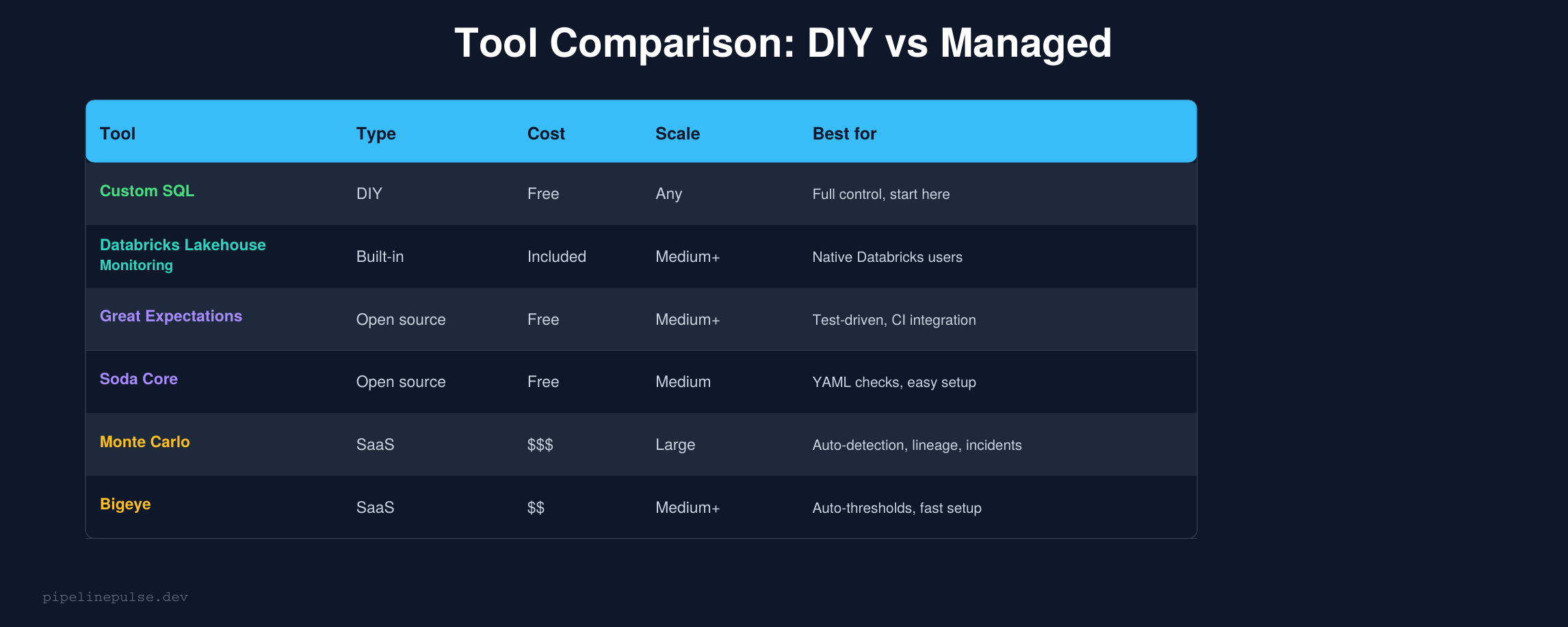
Custom SQL (this guide) — start here. You understand exactly what's being checked, there's no vendor lock-in, and it's free. Works well up to ~50 tables. Beyond that, maintaining the checks becomes a job in itself.
Databricks Lakehouse Monitoring — if you're already on Databricks, this is the natural next step. It generates statistical profiles of your tables automatically and detects drift. No external tool to manage. Best for teams that want "good enough" monitoring with zero setup overhead.
Great Expectations — the gold standard for test-driven data validation. You write expectations as code, run them in CI/CD, and get detailed reports. Best for teams that want validation integrated into their deployment pipeline. Learning curve is steeper but the control is worth it.
Soda Core — YAML-based checks that are easier to write than Great Expectations. Good Slack integration. The open-source version handles most needs; the paid version (Soda Cloud) adds a UI and anomaly detection.
Monte Carlo — the leader in fully managed data observability. Auto-detects anomalies, provides lineage, and manages incidents. Best for large teams with 200+ tables that need enterprise-grade coverage. The price reflects this — it's not cheap.
Bigeye — similar to Monte Carlo but with auto-thresholds that reduce setup time. Good middle ground between DIY and Monte Carlo for medium-sized teams.
The Maturity Ladder
Not every team needs Monte Carlo. Here's how to think about where you are and what to build next:
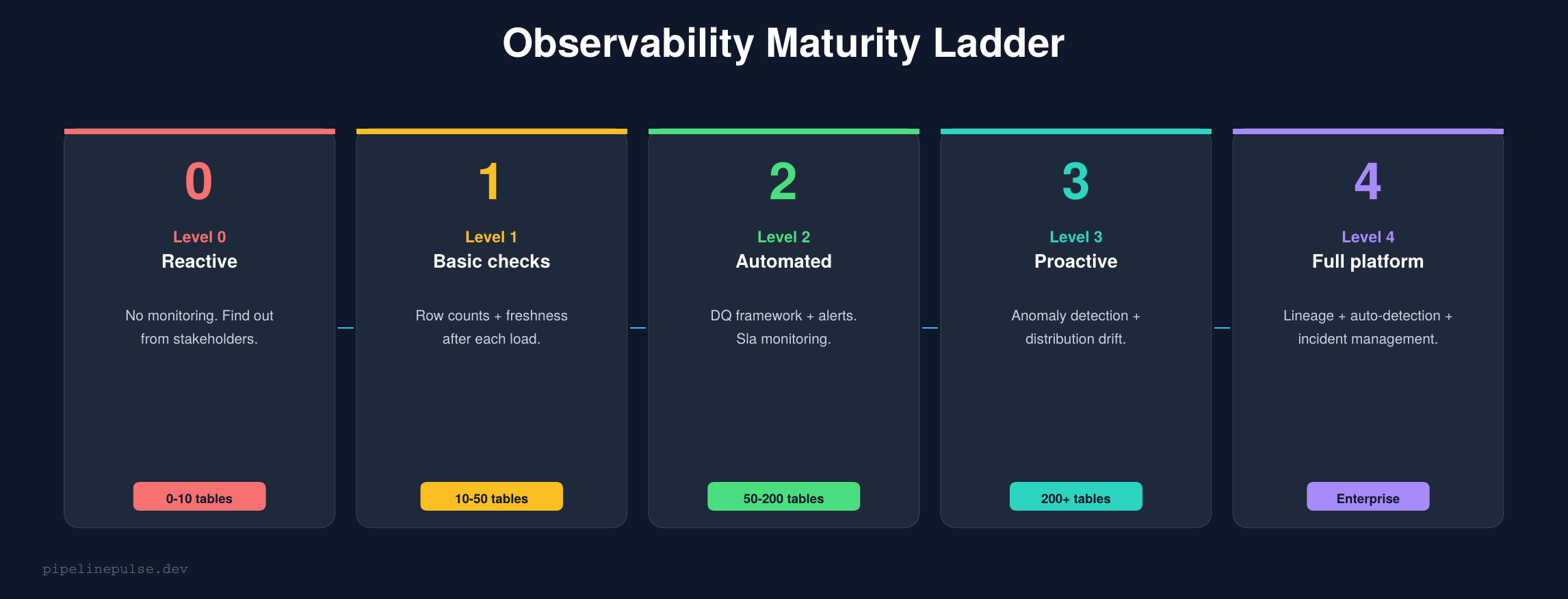
Level 0 → Level 1 is the biggest jump in value. Adding basic freshness and volume checks catches 80% of the issues that reach stakeholders. Start here.
Level 1 → Level 2 means automating the checks and adding alerts. This is where the Data Quality Monitoring Playbook framework fits — scheduled checks with Slack/email alerting.
Level 2 → Level 3 is where you start needing distribution drift detection and anomaly detection. This is where Great Expectations or Soda earn their keep. Or if you're on Databricks, Lakehouse Monitoring.
Level 3 → Level 4 is enterprise territory — full lineage, incident management, auto-root-cause analysis. Monte Carlo or Bigeye.
Most teams should aim for Level 2 and stay there until the pain of not having Level 3 becomes obvious. Don't over-buy tooling you don't need yet.
What to Monitor First
If you're starting from zero, here's the priority order:
Week 1: Freshness SLAs on your top 5 critical tables. This alone will catch most silent failures.
Week 2: Volume checks — row count vs 7-day rolling average. Alert on >30% deviation.
Week 3: Null rate tracking on required columns. Alert on >2% null rate where 0% is expected.
Week 4: Schema change detection. Compare DESCRIBE TABLE output across runs.
Month 2+: Distribution drift on key numeric columns. Start with averages and medians vs baseline.
This progression matches the maturity ladder — each week moves you one step up without overbuilding.
Common Gotchas
1. Don't monitor everything equally. Your gold reporting tables need tight SLAs. Your bronze raw tables don't. Prioritize monitoring effort by business impact.
2. Alert fatigue is real. Start with loose thresholds and tighten over time. A system that alerts 20 times a day gets ignored. Aim for <3 alerts per day that each require action.
3. Freshness != correctness. A table can be fresh (updated 5 minutes ago) but contain garbage data. Freshness is necessary but not sufficient — you need volume and distribution checks too.
4. Don't skip the audit table. Logging check results creates a history you can query. "When did this table's null rate start spiking?" is answerable if you've been logging. Without the log, you're guessing.
5. Lineage is the last pillar to implement, not the first. It's the most complex and least actionable for small teams. Get freshness, volume, and distribution solid first.
6. Tool adoption should follow pain, not hype. If your custom SQL checks work and you have 30 tables, you don't need Monte Carlo. Buy tools when the maintenance burden of DIY becomes the bottleneck, not before.
Get the Toolkit
Want the complete observability system — monitoring SQL templates, audit table DDL, freshness dashboard queries, distribution drift detection, and the full tool comparison? Grab the Data Observability Toolkit on Gumroad for $4.99.
Also check out:
- Data Quality Monitoring Playbook ($4.99) — the foundation before observability
- Delta Table Troubleshooting Checklist ($9)
- Pipeline Architecture Templates ($4.99)
- Databricks Debugging Kit ($4.99)
- Databricks Cost Optimization Checklist ($4.99)
Building data pipelines that don't break at 3am? That's what PipelinePulse is about. More guides at pipelinepulse.dev.